When company locations span multiple cities and continents, keeping teams in sync becomes a logistical nightmare. Sharing sensitive information between locations requires fast, secure and reliable channels. This is the core value proposition of virtual private networks (VPNs). But if you’ve ever wondered how VPNs work, the answer lies in how they bridge the gap between private needs and public infrastructure.
Tunnel mechanics
In its simplest form, a VPN server acts as a gateway. It uses a public network (usually the open Internet) to connect remote sites and users into a single unified entity. The connection is not physical. It is “virtual” and is routed directly from a private network or third-party service provider to a remote user over the Internet.
The magic happens in encryption. When data is sent through this tunnel, it is encrypted. Even if they could intercept traffic on the public network, all they could see was gibberish. They can’t read it, change it or steal it.
Dedicated line era
To understand why VPNs are now the norm, we need to look back at how they used to be. A few years ago, you had to rent a leased line to connect computers between offices. Technologies such as ISDN (Integrated Services Digital Network) provide connection at speeds such as 128 kbps. This is a private line leased from the telecommunications company.
They worked. They were secure. But they are also very expensive. The costs increase according to the distance. If you have one office in New York and one in London, the cost of a leased line can be astronomical. These connections form a wide area network (WAN), but there are high financial barriers to expansion.
Internet takeover
Then the Internet became popular. Internet service providers (ISPs) have begun to offer faster and more reliable connections at a fraction of the cost of leased line connections. Businesses didn’t just switch to the internet; They have optimized it.
The first is the intranet. This is a private internal network for employees only. This allows remote colleagues to share their desktops and resources as if they were in the same room. However, intranets have limitations. They stay in the building. By adding VPN servers on top of this infrastructure, companies can extend these intranet resources to anyone, anywhere. Home offices and remote branch offices suddenly had access to the same files and applications as their headquarters without having to pay for private line.
Beyond the Boardroom
VPNs have evolved. It’s not just for businesses anymore. Individuals have also caught on. People who are concerned about the security of public WiFi networks or who want to conduct online transactions anonymously subscribe to a paid consumer VPN service.
The mechanism is similar to the business model, but the user flow is different. Instead of connecting to a company’s private servers, you connect to your VPN provider’s servers to access the Internet. advantage? security and privacy.
A VPN protects your computer, smartphone, and other devices from hackers and malware while protecting your personal information and communications from prying eyes.
With cybercrime on the rise, this protection is no longer an option for many. Using a consumer VPN is easy. Download the software. Install it. Connect to server. Once activated, your online identity will be masked. Your ISP can’t see what you’re doing. Your location is hidden. Your browsing history is encrypted.
This is especially useful for travelers. Public WiFi in airports and hotels is often unsecured. A VPN creates a secure tunnel that prevents local hackers from stealing your login information. It also lets you bypass geo-restrictions. Access international streaming content, including your local Netflix library. In countries with strict internet censorship, such as China and Russia, some VPN services can help you maintain access to blocked websites and social platforms.
The Island Analogy
If you want to visualize the differences between these network options, think of each local area network (LAN) as an island.

You live on an island in the middle of a vast ocean. There are thousands of other islands on the horizon. There are also neighbors. Everything else is a distant point. The common means of transportation between them is a ferry.
Here’s the problem. There is no privacy on ferries. Everyone on the boat can see what you’re doing.
Think of each island as a private local area network (LAN). The sea is the internet. Riding the ferry is like connecting to a web server or device over a public network. You can’t control your infrastructure. You cannot control your router. You can’t control the wire. You and everyone else on the boat are trapped.
This lack of control creates a security risk. Connecting two private networks using a public resource like the Internet puts you at risk.
The Bridge Solution:租用线路
让我们改变一下场景。 你的岛屿决定建造一座通往邻近岛屿的桥梁。 这提供了一条更简单、更安全、更直接的旅行路径。
它很贵。 即使岛屿很近,建造和维护这座桥也要花费一大笔钱。 但对可靠、安全连接的需求是如此强烈,以至于您付出了代价。
现在,想象一下您的岛屿想要连接到第三个岛屿。 这个距离很远。 你看看扩建这座桥的成本。 实在是太多了。 你买不起。
这是一条租用线路 。
这座桥与海洋分开存在。 它直接连接岛屿。 公司选择此选项是出于安全性和可靠性的考虑。 他们需要连接远程办公室。 但如果这些办公室相距数千英里,成本就会变得令人望而却步。 距离越远,价格就越高。
The Submarine Alternative: VPN
So how does a Virtual Private Network (VPN) fit into this analogy?
Imagine that every island has a mini submarine. These submarines have certain characteristics.
- ** Speed. ** They are fast.
- Portability. You can take it with you anywhere.
- ** Invisible. ** You can hide from other ships and submarines.
- Reliability. They work reliably.
- **Scalability. ** It costs little to add more submarines after the first purchase.
With these submarines, the islanders can travel across the ocean at any time. They maintain privacy and security. It is not visible from sea traffic.
Basically, this is how a VPN works.
Remote devices on the network can communicate securely. They use the Internet as a means of communication with their private local network. The connection is encrypted. It is protected from prying eyes.
Why scalability is important
VPNs have one big advantage over leased lines. It’s scalability.
Easily add users to your VPN network. Connect users in different locations without installing new physical cables. Distance doesn’t matter. VPN allows you to connect to multiple geographic locations around the world at minimal additional cost.
With leased lines, each new branch requires a new expensive physical line. With a VPN, you only specify another endpoint. The infrastructure remains the same. The cost structure has changed significantly.
Which brings me to my next question. What is a good VPN? You should focus on specific benefits and features that make a simple encrypted tunnel a powerful business tool.

Virtual Private Networks (VPNs) exist to create secure, encrypted tunnels between networks of public infrastructure such as the Internet. It’s not just about hiding your IP address. This is to maintain a trusted connection so that outsiders cannot read your information. Before we get into the technology behind it, it helps to understand why these services are really useful for businesses and individuals.
What you get from a VPN
A well-designed VPN service should offer more than just privacy. This is about infrastructure. Key benefits include the ability to cover multiple geographic locations without having to lease expensive physical lines. Improves data transmission security. This allows remote offices and employees to access the company’s intranet as if it were directly connected to the local network, using only their existing Internet connections. It also has practical benefits. Employees can save on commuting expenses by working in a virtual workplace. Remote workers are often more productive when they have a stable connection.
Not all businesses need all features. However, companies adopting a VPN must meet three non-negotiable requirements.
- Security: Tunnels must protect the data being transferred. Even if an intruder was eavesdropping on your traffic, that information should be useless.
- Reliability: Connections must be consistent. Remote users and offices should be able to connect without friction, regardless of server load. The quality of the service should not be reduced just because the system handles the maximum capacity.
- Scalability: As your business grows, so does your VPN infrastructure. You don’t have to destroy the entire system just to add a user.
Privacy compromises
Public VPN service providers are usually judged on two metrics: the amount of user data they log and the number of countries in which they host servers. The main promise of a VPN is to keep user data private. You can bypass geo-restrictions by masking your real location. Consider a streaming service that is limited to a specific country. A VPN allows you to re-use content.
There is no single standard for configuring a VPN. This lack of unity means that choices must be made. You need to choose the appropriate protocol for your network, authentication and security. You need to understand how these components interact. If you are building your own product, it is your responsibility to choose the right combination.
Remote Access VPN
The term “VPN” is often synonymous with remote access. This type allows a single device to connect to a private network. This is the workhorse of modern hybrid work.
How it works
When you connect to a remote access VPN, your device establishes a secure link to your service provider’s servers. This process involves several levels. First, the device’s client software starts a handshake with the server. This handshake proves who you are. This creates an encrypted tunnel. All Internet traffic is routed through this tunnel. This is taken from the VPN server’s IP address, not your IP address.
The protocols matter
Not all tunnels are created equal. The protocol you choose determines speed, security and compatibility.
- OpenVPN: An open source standard. It is widely supported and generally considered safe. Works well on most devices.
- WireGuard: New competitor. The code is simpler, so there are fewer errors. Faster than older protocols.
- IKEv2/IPsec: Suitable for mobile devices. It also gracefully handles network changes, such as switching from Wi-Fi to cellular data.
Choosing the right protocol is more than a technical detail. It affects your daily experience. Slow protocols can make browsing frustrating. A weak one leaves you exposed.
Why companies pay attention
For businesses, remote VPNs bridge the gap between physical offices and distributed teams. This allows secure access to internal resources. file server. database. Internal tools. Without a VPN, exposing these systems directly to the Internet is risky. VPNs add layers of authentication and encryption. It keeps the bad guys away.
But it’s not a panacea. A VPN protects your connection. Endpoints are not protected. If your laptop is infected with malware, a VPN will not prevent your data from being stolen. The tunnel is safe. The other party’s device may not.
The User
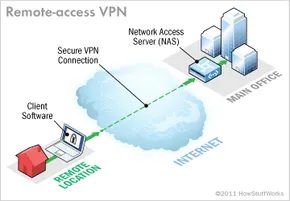
A remote-access VPN serves a simple but critical function: it lets individual users tap into a private network from anywhere. For the person on the other end, it feels like they are plugged directly into the office servers. Consider a large corporation with hundreds of sales representatives traveling across the country. Without a remote-access VPN, those reps would be isolated from internal tools. With it, they have seamless access to secure resources as if they were sitting at their desks.
This technology is also known as a virtual private dial-up network (VPDN ). The name harkens back to the early days of the internet when connecting required dialing into a server via an analog telephone line. Today, that hardware is gone, but the core concept remains the same.
To make this work, you need two distinct components.
The Gateway: Network Access Server
The first piece of infrastructure is a network access server (NAS ). In industry slang, it’s often pronounced “nazz.” You might also hear it called a media gateway or a remote-access server (RAS ).
Note: Don’t confuse this with Network-Attached Storage, which shares the same acronym but stores files rather than managing connections.
A NAS can be a dedicated piece of hardware or just one of several software applications running on a shared server. It is the endpoint that users connect to from the public internet. Before granting access, the NAS demands valid credentials. It verifies these credentials either through its own built-in process or by querying a separate authentication server located elsewhere on the network.
The Client: Software on the User’s End
The second requirement is client software. Employees need an application on their computers to establish and maintain the tunnel to the NAS.
Most modern operating systems come with built-in VPN clients capable of handling remote-access connections. However, some proprietary systems require users to install a specific third-party application. This client software is responsible for two heavy lifting tasks:
- Tunneling : It establishes a secure path to the NAS, identified by its internet address.
- Encryption : It manages the cryptographic keys that keep the data stream unreadable to outsiders.
You can dive deeper into how tunneling and encryption protocols actually function later in this overview, but for now, understand that the client software is the bridge between the user and the secure network.
Who Manages the Infrastructure?
Large organizations with robust IT departments typically purchase, deploy, and maintain their own remote-access VPN infrastructure. They have the expertise to handle the nuances of deployment and ongoing maintenance.
Smaller businesses or those without specialized IT staff often outsource this responsibility. They rely on an enterprise service provider (ESP ). An ESP handles the setup of the NAS and ensures it remains operational, allowing the business to focus on its core operations rather than network security logistics.
Beyond Individual Users
Remote-access VPNs are excellent for individuals. They solve the problem of the traveling employee or the remote worker. But what happens when an entire branch office needs to connect? Dozens, or even hundreds, of employees might need simultaneous access to the central network.
A remote-access VPN is not the most efficient solution for connecting whole offices. For that, businesses turn to a different architecture.
Site-to-site VPN
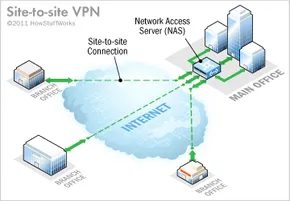
From one site to another, a VPN acts as a digital bridge. Connect several fixed locations via the public Internet, effectively expanding your company’s internal network. Instead of storing your data in one building, you can access your resources from a branch office on the other side of the world as if you were sitting next to a server.
This arrangement is important for growing companies with dozens of branches. It’s not just about convenience. It’s about maintaining a unified infrastructure.
Intranet and Extranet model
There are two main types of site-to-site connections. The type you choose depends on who you need to talk to.
Intranet based VPN For internal use. If your company has multiple remote offices and you want to use them as a single private network, this is the way to go. Connect individual local area networks (LANs) to wide area networks (WANs). result? A seamless on-premises environment across geographically dispersed sites.
The door to extranet-based VPNs is a bit wider. This applies if you have a close relationship with another party (supplier, partner or major customer). Create a secure tunnel between the local network and the other party’s local network. This allows you to collaborate in shared spaces without exposing your core intranet to the outside world. Enjoy the benefits of integration without the security risks of full access.
Why equipment matters
Although site-to-site VPNs and remote access VPNs share some underlying technology, their goals are different. Remote access VPNs usually require individual users to log in via client software on laptops. Site-to-site VPNs must be transparent to end users.
Ideally, you want to eliminate the need for VPN client software on every computer. Instead, special equipment can handle the heavy lifting. The device is located at the edge of the network and automatically creates tunnels. It’s cleaner, faster, and less prone to user error.
How data is hidden inside the tunnel
So how does your data stay safe on the chaotic public internet? Through the tunnel.
When you send a file, it is split into packets. The tunnel wraps each packet inside another packet before sending it. The case protects the contents from the public. This ensures the flow of information within the virtual private corridor.
This layering process is called encapsulation.
Devices at either end of the connection (called tunnel interfaces) handle this wrapping and unwrapping. Your IT team configures these interfaces to use specific tunneling protocols. Also known as an encapsulation protocol, this standard defines how data packets are bundled.
Think of it like shipping a delicate item. The vendor packs the item (passenger protocols such as IP) into boxes (tunneling protocols). The shipping company puts the boxes on the truck (transport protocol) and drives the highway (internet). You receive the truck, open the box and take out the item. The box protected the item during transport. A highway is just a route.
Most VPNs use this method. However, some services like ExpressVPN offer split tunneling. This feature puts you in control. You can choose which apps send data through a secure VPN tunnel and which use a standard, high-speed local connection. This is a useful compromise for bandwidth-intensive tasks that do not require encryption.
Speak the same language
Early computer networks were tribes. Microsoft used NetBEUI for Windows. Apple uses AppleTalk. They didn’t speak the same language. When hybrid networks emerged, systems had to install translators to bridge the gap.
The Internet has changed that. Hardware and software have been redesigned to use a common TCP/IP stack.
Almost all computers today communicate using the TCP/IP protocol. This single stack handles everything from addressing to transmission. It’s why a Windows machine can talk to a Mac, which can talk to a Linux server, and which can talk to a router in Tokyo. Standardization is the backbone of global connections.
The Gear Behind the Curtain
为了使这一切成为可能,您需要网络边缘的特定硬件。

Technically, you can run a VPN on a regular server. But most companies don’t do this. They want hardware that is made specifically for the job.
Small businesses can keep everything in house. Alternatively, they may hand it off to a business service provider. Large companies with distributed branches often choose co-location. This means renting space in a colo built for speed and uptime. You get the infrastructure. They are responsible for electricity and fiber optics.
There is no single standard for VPN setup. When designing an extension, you need to look at your hardware stack.
Core infrastructure
First, you need a Network Access Server (NAS). This is the flagship product for remote access VPNs. It builds and keep it alive.
Then there is the firewall. This creates a hard wall between your private network and the public Internet. You can configure it to block traffic on specific TCP or UDP ports. This is essential even if you don’t have a VPN. Malicious Internet traffic doesn’t care if there is a tunnel or not.
Authentication, authorization and accounting are handled by the AAA server.
– Authentication confirms who you are.
– Authorization decides what you can access.
– Accounting tracks what you do while logged in.
The most commonly used tool is RADIUS. Yes, the name refers to dial-up days. The reality is different. The RADIUS server integrated in the VPN handles the authentication of all connections via the NAS.
Dedicated vs. Shared
These components can run on a shared server. But there are also risks. Security suffers. Reliability decreases.
Small businesses can use firewalls and RADIUS software on commodity hardware to save costs. However, as the company grows, generic servers became a bottleneck. You need optimization.
Specialized VPN Equipment
If you don’t have enough generic gear, you can buy specialized hardware. These are procured from major network hardware suppliers.
- VPN Concentrator : This replaces the AAA server on a generic box. It uses a combination of hardware and software to establish tunnels and handle massive numbers of simultaneous connections.
- VPN-capable router : A standard router that adds protocol-specific routing to VPN traffic.
- VPN-Enabled Firewall : A traditional barrier that also controls VPN-specific protocols.
- VPN client : A special device that uses tunnel interface software. This reduces the burden on individual computers. Client software no longer cluttering every endpoint.
We’ve covered the types and hardware. Now let’s look under the hood at the encryption and protocols that keep everything secure.
Sponsored Link: Click here to learn more about VPN hardware and installing a VPN on a router.
Encryption and Security Protocols in a VPN

Encryption is a mechanism that converts readable information into unreadable code. Only a device with the correct decoder can reverse the process and understand the message again. You probably use it every day, whether it’s locking files on your hard drive or sending sensitive emails. The engine behind this is the encryption key. It tells the computer exactly what mathematical operations to perform to scramble or unscramble the data.
There are two main ways to do this. Symmetric key encryption and public key encryption.
In symmetric key encryption, all parties share the same key. One person uses this key to lock the message and another person uses the same key to unlock the message. This is fast and efficient, but you need a secure way to share the key first.
Public key encryption is more complex, but solves the distribution problem. Each user has a pair of keys. Anyone who wants to send you a message can use your public key. Your private key is kept secret. You encrypt with your private key, and the recipient decrypts with your public key. Wait a minute, that’s not right. Usually, the sender uses the receiver’s public key for encryption and the receiver uses his private key for decryption. This ensures that only the intended recipient can read it.
Securing tunnels with IPSec
Virtual Private Network (VPN) Create a secure “tunnel” for your data. Data is encrypted at one end and decrypted at the other end. But a key pair alone is not enough to build the tunnel itself. We need a protocol that defines how data is packaged and sent.
If it’s a site-to-site VPN (connecting two offices, for example), you’ll usually see Internet Protocol Security (IPSec) or Generic Routing Encapsulation (GRE).
The GRE is relatively simple. It simply provides a framework for encapsulating different types of network traffic so that it can be sent over an IP network. The data itself is not encrypted. It just knows how to carry the payload.
IPSec is the heavy lifter. It is widely used to secure traffic on IP networks, including the open Internet. Works between routers, firewalls, desktops and servers. IPSec uses two sub-protocols to ensure the security of data packets.
- Encapsulated Security Payload (ESP): This is the workhorse. The symmetric key is used to encrypt the actual data (payload) inside the packet.
- Authentication Header (AH): This uses a hash function in the packet header. This helps hide metadata such as the identity of the sender until the package reaches its destination.
IPSec works in two modes. Transport mode encrypts data between two specific devices only. Tunnel Mode Encrypts the entire packet including the header. This is what a VPN uses. IPSec ESP and AH are used together to create a virtual tunnel between two networks.
Remote access and PPP variants
A Remote Access VPN (which allows you to connect a laptop to a corporate network) tunnel is usually based on Point-to-Point Protocol (PPP). PPP is a standard part of the Internet infrastructure. In particular, remote VPNs typically use one of three PPP-based protocols:
- L2F (Layer 2 Forwarding): This protocol developed by Cisco uses authentication methods supported by PPP.
- PPTP (Point-to-Point Tunneling Protocol): An older standard that supports 40 and 128-bit encryption and PPP authentication.
- L2TP (Layer 2 Tunneling Protocol): Combines the best features of PPTP and L2F. Full support for IPSec makes it a reliable choice for remote and site-to-site connections.
Why this matters to you
We’ve covered the types of VPNs and the technical core that makes them work. Technology is constantly developing. New encryption methods and faster processors improve network performance over time. However, the core tunneling protocol has not changed dramatically. Why? Because the existing standards are sufficient to ensure the successful operation of global business.
But for the average user, the “how” matters less than the “why”.
Are VPNs illegal?
No. Using a VPN is completely legal in most parts of the world. Local laws still apply if you commit a crime while using a VPN. This tool does not provide immunity.
Why do people use them?
In addition to security, a VPN also lets you bypass restrictive digital policies. If your country blocks certain websites, a VPN can allow you to route your connection through servers in countries with more liberal internet laws. Traffic is encrypted, hiding your identity and browsing habits from local ISPs and censorship agencies.
What is Private Internet?
When you use a VPN service, traffic is routed through a intermediary server. This creates a layer of anonymity. The websites you visit see the IP address of the VPN server, not your IP address. This makes your connection more secure and private. You can also unblock geo-restricted content, such as Netflix and BBC iPlayer’s streaming libraries, which are restricted to certain regions.
Are VPNs good or bad?
Overall it’s good. Benefits include access to restricted websites, potential savings on online purchases (prices may vary by region), and strong data protection.
However, there are also disadvantages. VPNs can slow down your connection due to server-to-server distance and additional encryption overhead. There is usually a monthly fee. Additionally, some streaming services and platforms have developed anti-VPN software to block these connections.
Can You Be Tracked?
Not really. With the right VPN, no one can easily track your real IP address or track your website traffic. Data is hidden with encryption. If you choose a reliable service provider with a strict no-logging policy, your activity will remain private.
The technology has matured. The protocols are stable. The question is no longer whether it works, but whether you want to use it.