You don’t need a degree in networking to understand that the internet runs on bits. But if you dig a little deeper, you’ll find it runs on network packets. Everything you do online, from loading this page to sending a quick text, is broken down into tiny chunks called packets. Networks that handle data this way are known as packet switched networks, and they are the backbone of modern connectivity.
When you send an email or request a webpage, the internet doesn’t just blast the whole thing at once. It chops the data into manageable pieces. A typical packet might hold around 1,000 to 1,500 bytes of your message body. It’s not just raw data though. Each chunk carries its own instruction manual. It includes the sender’s IP address, the receiver’s IP address, and a counter that tells the network exactly which packet this is out of the total sequence.
All of this travels over the Transmission Control Protocol/Internet Protocol (TCP/IP). That’s the standard language the internet uses to talk to itself.
Why Break Data Into Pieces?
You might wonder why we don’t just send the whole file at once. The answer lies in efficiency and resilience.
Once a packet is ready, it is sent toward its destination via the best available route at that millisecond. Here is the weird part: every packet in your email might take a different path. Some might travel the same way. Some might not touch each other until they reach the end.
This approach does two critical things for your connection:
- Load Balancing: The network can distribute traffic across various pieces of hardware instantly. No single server gets overwhelmed while others sit idle.
- Fault Tolerance: If a router fails or a cable is cut mid-transmission, the remaining packets simply find a new route around the blockage. The message still arrives. The network doesn’t stop.
What Else Are They Called?
Terminology in networking can be messy. Depending on the layer of the network model or the specific type of connection, these packets might go by other names:
- Frame
- Block
- Cell
- Segment
Don’t let the different labels confuse you. They all refer to the same fundamental concept: small, self-contained units of data traveling across a network.
The Anatomy of a Packet
Understanding how these pieces fit together is the next step. We’ll look at the specific structure of a network packet and walk through a real-world example of how data moves from your screen to someone else’s.
Data doesn’t move across the internet as one giant, indivisible blob. It gets chopped up.
Most network packets split into three distinct parts. This structure isn’t arbitrary. It’s how your device talks to another device without getting confused by the chaos of the web.
Here is what each part does.
The Header: The Shipping Label
The header is where the instructions live. It tells the network what to do with the data it’s carrying.
Think of it as the envelope.
It includes:
– Length: Some networks use fixed sizes. Others need the header to specify how big the packet is.
– Synchronization: A few bits that help the receiving device line up with the network clock.
– Packet Number: If you send a large file, it breaks into many pieces. This number tells the receiver which piece it is receiving.
– Protocol: Is this an email? A web page? Streaming video? The protocol defines the type.
– Destination Address: Where it’s going.
– Originating Address: Where it came from.
Without this, the data is just noise. Routers look at the destination address in the header and check their lookup tables. They decide the next hop.
The Payload: The Meat
This is the payload. Also called the body or data.
It’s the actual information you care about. The text of your email. The pixels of the image.
If the network uses fixed-length packets, the payload might not fill the space. In that case, it gets padded with blank bits to meet the size requirement.
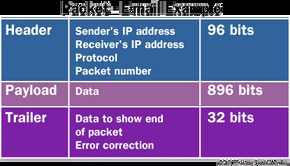
In our email example, each packet has 896 bits of space for payload. The header takes 96 bits. The trailer takes 32 bits. Total packet size is 1,024 bits.
The Trailer: The Error Check
The trailer, or footer, marks the end of the packet.
It usually contains error-checking bits. The most common method is Cyclic Redundancy Check (CRC).
CRC is surprisingly clever.
Here is how it works:
1. The sender adds up all the 1s in the payload.
2. It converts that sum into a hexadecimal value.
3. It stores that value in the trailer.
When the packet arrives, the receiver does the same math. It adds up the 1s in the received payload. Then it compares the result to the value in the trailer.
If the numbers match, the packet is good.
If they don’t match? The data got corrupted in transit. The receiver asks the sender to resend the packet.
No guessing. No broken images. Just a simple math check.
Putting It Together: The Email Example
Let’s look at a real scenario.
You send an email to a friend. The message is 3,500 bits long.
The network uses fixed-length packets of 1,024 bits.
- Header: 96 bits
- Trailer: 32 bits
- Available Payload: 896 bits
To send 3,500 bits, you need four packets.
- Packet 1: 896 bits of payload
- Packet 2: 896 bits of payload
- Packet 3: 896 bits of payload
- Packet 4: 812 bits of payload (the remainder)
Each packet carries the same protocol info, your IP address, your friend’s IP address, and a sequence number (1, 2, 3, or 4).
Routers route them independently. They might even take different paths.
When they arrive at your friend’s computer, the header and trailer get stripped off. The computer looks at the sequence numbers. It reassembles the data in the correct order.
The email appears. Whole.
Packet-Switched Networks FAQ
How do packets work on the internet?
Everything you do online relies on packets. Every webpage loads as a series of packets. Every email leaves as a series of packets.
Networks that handle data this way are called packet-switched networks.
Why is data divided into packets?
Efficiency.
Breaking data into small chunks lets the network balance the load. It can route traffic millisecond by millisecond.
It also provides resilience. If one piece of equipment fails, packets can be routed around the problem. The message still gets delivered. Just not in the fastest way.
What is a packet structure?
Three parts: header, payload, and trailer.
The header has instructions. The payload has the data. The trailer has the end-of-packet markers and error checks.
Is the internet a packet-switched network?
Yes.
The internet is a connectionless network. It uses packet switching for everything. There is no dedicated line between you and the server. Just packets flying through a web of routers.
More on Networking
If you want to dig deeper, these topics connect directly to how packets function:
- How Ethernet Works
- How VoIP Works
- How E-mail Works
- What is an IP address?
- How Bits and Bytes Work
- How Web Servers Work
- How Home Networks Work
- How Routers Work
- How Internet Infrastructure Works
For a quick definition, check whatis.com ‘s entry on packets.