Avira Free Security has shifted from a basic antivirus tool into a comprehensive digital defense suite. The German developer didn’t just stop at malware detection. They bundled privacy tools and performance optimizers into one package. The goal is simple. Keep your devices safe without slowing them down. It works whether you are a casual browser or a heavy data processor.
The software’s biggest strength lies in its broad compatibility. You don’t need to jump through hoops to get it running.
Windows Support Across Versions
Windows users have extensive options here. Avira supports Windows 11 and 10 out of the box. It also maintains backward compatibility with older systems. Windows 8.1, 8, and 7 remain functional. This matters because many users still rely on legacy hardware or specific enterprise software that won’t run on newer OS versions. The suite adapts to these variations without losing its core protective capabilities.
macOS and Mobile Security
Mac users aren’t left in the dark. There is a dedicated macOS version. It tackles threats specific to Apple’s ecosystem. The interface remains consistent with the Windows experience.
Mobile security is equally prioritized. Android and iOS get their own tailored applications.
- Android : Focuses heavily on blocking malicious apps. It scans installations before they execute.
- iOS : Targets privacy leaks. It watches for suspicious Wi-Fi connections. It also helps manage password hygiene.
The philosophy across all platforms is uniform. Simplicity. Lightweight operation. Consistent protection. It doesn’t bog down your battery life or eat up storage space.
The Linux Gap
Here is the catch. There is no native Avira Free Security for Linux. If you run Ubuntu, Fedora, or Arch, you’re on your own regarding this specific suite. You won’t find a Linux client in their download center.
For students and independent workers, this might be a dealbreaker. However, for the vast majority of personal users, the Windows and mobile coverage is sufficient. It covers the spots where most threats actually land.
Why It Matters for Everyday Users
The real value isn’t just in the code. It’s in the accessibility. You don’t need a degree in cybersecurity to use it. The interface is modern. Updates happen automatically. You don’t have to manually check for patches.
This makes it pragmatic for families. It works for freelancers working from home. It handles the basics so you can focus on what you’re doing, not on whether your device is secure. It’s robust. It’s free. And it runs almost everywhere.
Except on Linux.
That limitation keeps some power users away. But for the average person? It’s a solid wall between them and the internet’s rougher edges. The question is whether that’s enough. Usually, it is. Until it isn’t.
Getting started with Avira Free Security
Installation is straightforward. You don’t need to be a sysadmin to get this running. Download the package from Avira’s official site or trusted partners like Futura-Sciences. The links are verified, which reduces the risk of bundled malware—something you definitely want to avoid with free security suites.
The installer adapts to your OS. Windows and macOS users get a standard executable. It walks you through the steps. It even suggests which modules to enable based on your typical usage.
Modular control for Avira Free Security
This is where the suite shines. The software is modular. You pick what you want.
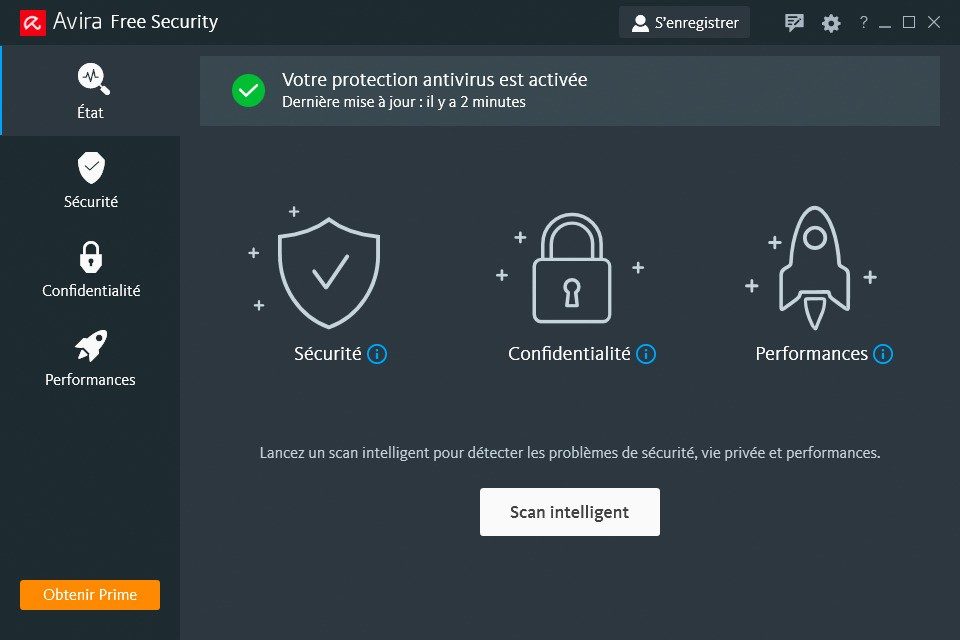
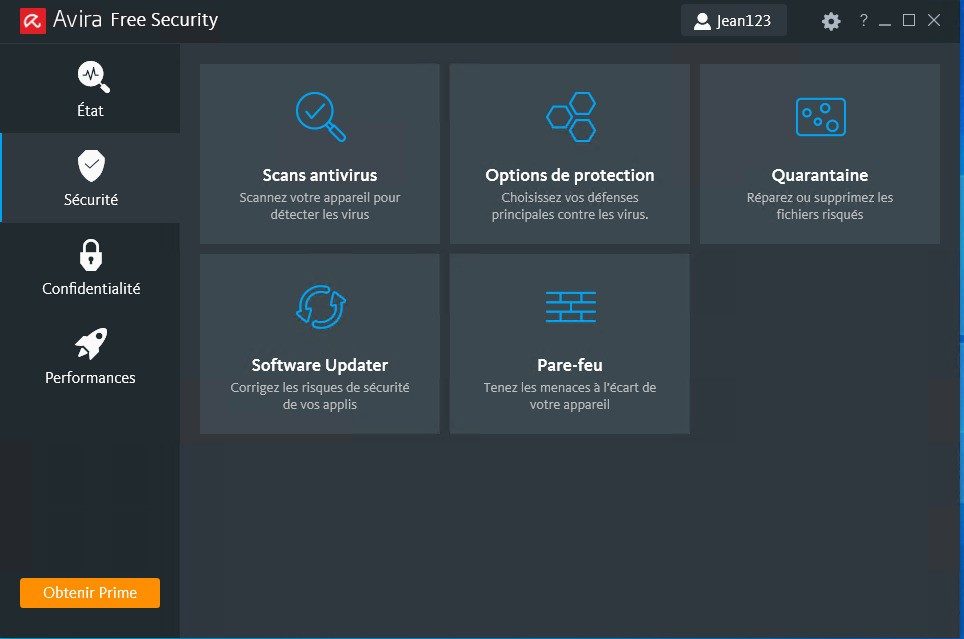
There is a central dashboard to toggle tools on or off. You can add the VPN. You can enable the password manager. You can turn on system optimization. Everything is managed from one place.
Mobile users aren’t left behind. Android and iOS installations happen through their respective app stores. The interfaces differ slightly from the desktop versions, but the core security remains intact. Focus areas include:
- Safe browsing
- Blocking suspicious apps
- Managing app permissions
- Protecting calls and SMS from phishing
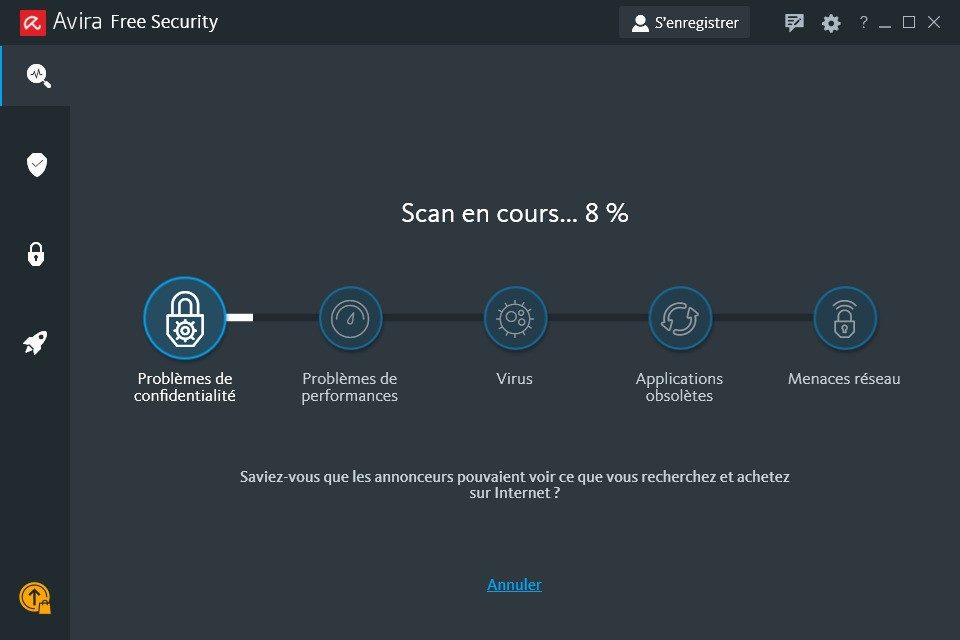
After installation, hit Smart Scan. This tool runs an automatic diagnostic. It checks for vulnerabilities. It hunts for malware. It flags outdated software. It also reviews privacy settings.
Customizing your protection level
The interface is designed for quick access. Click to activate the VPN. Click to scan the system. Click to update obsolete software. If you want more control, the settings menu lets you adjust security levels. You can schedule regular scans. You can set exceptions for specific apps.
When things go wrong, or when you just have questions, Avira provides an online knowledge base. Technical assistance is available for complex setups.
One notable advantage? Students and teachers get the full free version. No restrictions. Some competitors limit educational use, but Avira doesn’t.
Keep automatic updates on. The virus database needs to stay fresh. New threats emerge daily. If your modules aren’t updated, you’re flying blind.
Why Avira Free Security Outshines Competitors in Privacy
Most people think free antivirus means a stripped-down experience. Avira Free Security proves that wrong. You get real-time file scanning that watches both incoming and outgoing traffic. Then there is the secure browser. It blocks phishing attempts and redirects to dangerous sites before you even click. It is proactive. Not reactive.
The VPN is the standout feature for travelers. You get 500 MB per month. That is not unlimited. But it is enough to encrypt your connection on public Wi-Fi. It helps with anonymity. It also helps bypass geo-blocks. This matters for students studying abroad or remote workers checking email at a coffee shop.
Password management is built right in. It generates strong passwords. It stores them securely. It autofills them across all your accounts. With so many logins now, weak passwords are a liability. This tool removes the excuse. You can manage it all from one place.
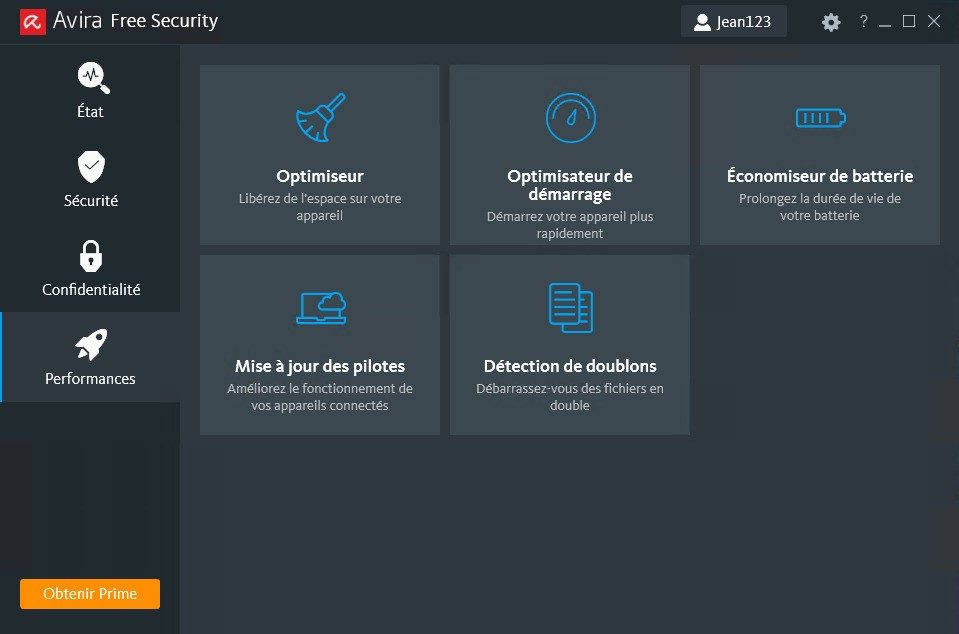
Performance optimization cleans up junk files. It removes unwanted extensions. It deletes superfluous data. Your machine runs faster. You keep full control over when these modules activate. It is flexible. You are not forced into a rigid schedule.
How It Compares to Bitdefender and Avast
Bitdefender Antivirus Free is popular. Avast Free Antivirus is everywhere. Avira sits in the middle with a focus on privacy and performance. The integration is homogeneous. The interface is simple.
It does not bomb you with aggressive ads. It respects your data. That builds trust. Users who care about sensitive information sleep better with Avira. The premium version adds ransomware protection. It offers unlimited VPN. It automates software updates. You also get priority support. But for basic security, the free tier holds its ground.
Managing Updates and Version History
Can you roll back to an older version of Avira Free Security? You can try. But you should not. Outdated versions lack critical security patches. They lack technical support. You are just asking for trouble.
Updates are automatic. But you can also check manually. Go to settings. Click the update button. It forces a refresh of the latest virus definitions. This gives you control. It fits the philosophy of a flexible suite. You adapt it to your usage.
Who Should Use This Software?
Home users need it. Students need it. Light professionals need it. The unified interface makes administration easy. It works on desktops. It works on smartphones. Security stays consistent. You are covered whether you are in a library or on a train.
There is no official certification from Avira. No dedicated curriculum for advanced use. However, there is plenty of documentation. Video tutorials exist. Community articles abound. You can learn cybersecurity basics from them. It empowers users. It spreads good practices.
Support and Common Pitfalls
Support for the free version is self-service. A comprehensive FAQ handles most queries. A discussion forum offers community help. This encourages peer-to-peer troubleshooting. It works for installation issues. It works for compatibility problems. It works for update glitches.
One major question comes up often. Can you run Avira alongside another antivirus? The answer is no. Do not stack security suites. It causes conflicts. It kills system performance. You need one strong shield. Not two weak ones clashing.
Final Thoughts on Digital Safety
Downloading Avira Free Security is a logical step. It secures your digital life without cost. The technology is constantly updated. It is recognized in the cybersecurity universe. It protects families. It protects students. It protects remote workers.
It combines simplicity. Modularity. Robustness. It opens the door to effective protection. The landscape of IT use changes fast. Your security needs to keep up. Avira offers a solid foundation for that.
“The absence of aggressive advertising and a strict respect for personal data reinforce user trust.”
This is not just about blocking viruses. It is about managing risk. It is about staying agile. The free version removes barriers to entry. You get the core tools. You pay with data attention. Not money. That is a fair trade for many.
The limits exist. You hit the 500 MB VPN cap. You miss out on ransomware specifics. You handle updates manually if you choose. But for everyday browsing, email, and social media, it is enough. It is robust. It is accessible.
What happens when you hit that VPN limit? You pause. You wait. You conserve bandwidth. It forces discipline. Maybe that is a good thing. In a world of endless connectivity, constraints remind us of the value of privacy. The software does not judge. It just functions.
The Nitty-Gritty Specs of Avira Free Security
Before you hit download, look at the hardware. It’s not just about having enough space; it’s about compatibility. Avira Free Security isn’t a one-size-fits-all hammer. It’s a specific tool designed for a specific crowd.
The software comes from Avira GmbH, part of the Gen group. You’re looking at a suite here, not a standalone scanner. That means antivirus, web protection, a quota-based VPN, password management, and system optimization all bundled into one package. It’s heavy on features, light on cost.
Operating System Compatibility
Which devices can run this? Windows 7 and up. That includes 8, 8.1, 10, and 11. If you’re still on XP, stop reading. You’re vulnerable regardless of what security software you install. macOS is supported. Android and iOS? Yes. It works on iPhones and iPads.
Here is where the rubber meets the road for many users. Linux is not supported natively. If you’re a Linux purist, look elsewhere. There is no native client.
The architecture targets general consumer devices. It’s built for home labs, student laptops, and light professional use cases like remote work. It’s not enterprise-grade, though. Don’t try to force it into a corporate domain controller.
Language and Distribution
You don’t have to be a native German speaker to use it, despite the origin. The interface is multilingual. French, English, German, Spanish, Italian. Pick your poison.
Where do you get it? The official Avira site. Futura’s software library. Google Play. The App Store. Direct links only. Avoid third-party download portals that bundle adware. That’s a classic trap.
Internet connection is mandatory. Not optional. You need it for activation. You need it for signature updates. You need it for the VPN, which has data caps anyway. Offline use is practically useless for a security suite that relies on cloud intelligence and real-time threat detection.
How It Works Under the Hood
Real-time protection runs in the background. It watches file access. It scans incoming email. It checks web requests. On-demand scans are there for manual checks. Automatic updates keep the threat database fresh. This isn’t a “set it and forget it” forever solution. You must let it update.
Support for the free version? Community forums and a knowledge base. No phone number to call. If you want priority support, you buy Premium. The free tier is self-service.
Privacy and Telemetry
This is the part most people skip until it’s too late. Data and privacy settings are local. You can control telemetry. You can toggle data sharing. It’s not a black box. The settings are buried in the application menu, but they are there. You have to go looking for them.
The scope is personal protection. Extend it with Premium if you need stronger VPN encryption or advanced defense layers. Stick to the free version if you just need basic antivirus and a little bit of web filtering.
It’s a solid entry point. But it’s not magic. It requires maintenance. It requires updates. And it requires you to actually read the license terms. Most people don’t. They click “Next” until the installation is done. Then they wonder why their browser keeps redirecting to a shopping site. Check the options. Watch the installer. It’s not that hard.
The hardware reality check
Laptops are not built to survive a drop. Neither are smartphones. When the screen shatters, the internal flex cables often snap too. You lose the display. You lose the trackpad. You lose the battery connection. It is a cascade failure.
This is where the “right to repair” movement hits a wall. Or rather, a glue wall.
Manufacturers use industrial adhesive to keep devices thin. Thin is good for marketing. It is bad for repair. Once you heat up the back glass on an iPhone or remove the screws on a MacBook, you are often compromising the water resistance permanently. The seals do not come back like new. They come back like okay.
“Repairability scores have dropped since devices became sealed units.”
This isn’t just about convenience. It’s about cost. A cracked screen on a mid-range phone can cost 40% of the device’s value to fix. Most people just buy a new one. E-waste piles up. Landfills fill up. It’s a cycle.
Software locks and diagnostics
Even if you have the skill to swap the part, the software might stop you.
Apple uses “serial numbers” tied to components. Replace a screen without using their official diagnostic tool? The system warns you. Features like TrueDepth (Face ID) stop working. You get a pop-up message. The phone still works. But not all of it works.
Samsung does something similar. Some parts are paired. Replace the battery? The health status resets. You lose the accurate percentage indicator. It’s a guess now.
This creates a dependency on authorized service centers. You pay more. You wait longer. You have less control.
Is this security? Or is it planned obsolescence?
The lines are blurry. Manufacturers argue that unauthorized repairs compromise user data and device integrity. They’re not entirely wrong. A poorly installed battery can swell. A bad screen can short out the motherboard. But the restriction goes beyond safety. It’s about keeping you in their ecosystem.
The third-party market
You don’t have to go authorized.
The third-party repair market is huge. It’s messy. It’s risky. But it exists.
You can find parts on eBay, AliExpress, or specialized suppliers. Some are OEM (Original Equipment Manufacturer). Some are aftermarket copies. The quality varies wildly.
- OEM parts: Made by the same factory. Good quality. Hard to distinguish from original.
- Aftermarket parts: Cheaper. Lower quality. Often thicker screens. Dimmer brightness.
- Refurbished parts: Pulled from broken devices. Viable. Cheap. Risky.
Tools matter. You need a heat gun. A suction cup. A spudger. A Torx screwdriver set. If you don’t have them, you can buy a kit. Or you can break your device further.
YouTube tutorials help. They show you the steps. They don’t show you the moment you slip and pierce the battery. That’s the risk. Lithium-ion batteries are volatile. Puncture one, and you have a fire.
Why this matters for you
You think you’re just fixing a phone. You’re actually making a choice.
Do you pay a premium for convenience? Or do you accept the risk to save money?
For businesses