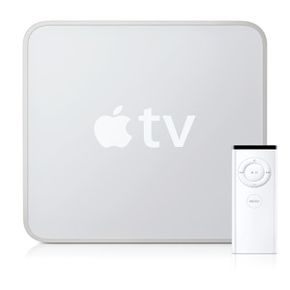
Apple has a long history of letting music lovers play with shiny new gadgets while the television set sits in the shadows. It’s easy to assume the company ignored the living room screen, focusing instead on iPods and later iPhones. That assumption was wrong. Apple TV didn’t just appear out of nowhere; it evolved. And now, people are actually buying them.
When Apple first shipped the original Apple TV in spring 2007, the pitch was simple: connect your computer’s power to your TV’s screen. You needed a widescreen display with HDMI, DVI, or component inputs. Add an Ethernet cable and an iTunes account, and suddenly your TV wasn’t just a box for broadcast signals. It became a portal.
The key here is that you don’t need a Mac. PC users can plug in too. Your media library doesn’t have to be stuck on one hard drive. Apple TV lets you stream photos, play music, and watch videos from the internet. This includes HD movies from major studios. It wasn’t always smooth, though. Early feedback in early 2008 was blunt. Steve Jobs admitted that users didn’t want just photos or music. They wanted movies. Period.
So Apple listened. The result? Unit sales tripled by January 2009 compared to the previous year. The hardware got better. The software got smarter. But how does it actually work with your existing entertainment setup? And why should you care about a small black box in your cable drawer?
How Apple TV Connects to Your TV
The core of the Apple TV experience relies on a few specific ports. You can’t just plug it into any TV. You need a display with High-Definition Multimedia Interface (HDMI) or Digital Visual Interface (DVI) inputs. Component video inputs work too, but you’re sacrificing some quality. The screen needs to be widescreen, specifically 16:9. Standard 4:3 sets won’t show the content correctly.
Once connected, the device pulls data from your local network. An Ethernet cable provides the most stable connection. Wi-Fi came later, but early models relied on wired connections for steady streaming. This network link is what allows the device to access the iTunes Store. Without it, you’re just playing local files.
The software side bridges your computer and the TV. Your iTunes library acts as the central hub. You don’t need to move files. The Apple TV accesses them over the network. This means your large collection of ripped CDs or downloaded movies stays on your PC or Mac. The TV just displays what’s sent to it.
Why Users Switched from DVD Players
The shift away from physical media wasn’t just about convenience. It was about access. Before Apple TV, watching a new movie meant buying a disc. You were limited to what was on the shelf. With the Apple TV, you could rent or buy HD titles from major studios. This is a significant upgrade over standard definition DVDs.
The content library expanded quickly. Initially, it was just a niche tool for tech enthusiasts. Then, the content improved. The “movies, movies, movies” strategy paid off. Sales jumped because the feature set matched what people actually wanted. They didn’t care about the network protocol. They cared about watching The Dark Knight in high definition without leaving their couch.
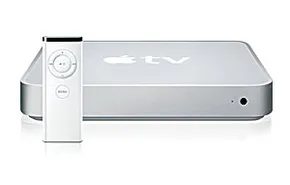

The Apple TV doesn’t look like a PC. It’s a tiny, silver box. But strip away the sleek casing and the hardware list reads like a basic computer spec sheet. You get an Intel processor. There is a hard drive—either 40GB or 160GB. 256MB of RAM. Wired and wireless Ethernet ports. An NVIDIA GeForce Go 7300 graphics card. HDMI and component jacks handle the video output to your HDTV. A USB port sits there for service technicians.
Standard definition TVs with component inputs can technically run the device. The catch? The picture stretches. It looks wrong. Apple chose to ignore letterbox formatting for SD. They bet on widescreen. They bet on the future. If your TV doesn’t support widescreen, just don’t bother.
Usability and Home Network Setup
Apple designed this thing to disappear into your living room routine. Plug it into the TV. It finds your wireless network automatically. Then you sync it to one computer’s iTunes library. That single sync grants access to libraries on up to five other computers in the house.
Grab the remote. Sit on the couch. Play music. Watch TV programs. Start a movie. Stream content from YouTube, Flickr, or MobileMe.
You don’t always need a network. You don’t need the Internet. Just like an iPod works offline, the Apple TV works offline. Sync your computer. Load the files onto the drive. Play them back.
The storage numbers matter here. The 40GB model holds about 50 hours of video. Or 9,000 songs. The 160GB drive stretches to 200 hours of video. Or 36,000 songs. That’s a lot of music.
Streaming and Rental Mechanics
When you do use the Internet, you browse Apple content. The iTunes store lets you rent newly released movies. Standard definition or HD. Surround sound. You start watching in minutes.
HD movies are data-heavy. They take longer to transmit. If your connection is slow, you wait. Apple gives specific benchmarks for this wait time. At 6Mbps, you wait less than 60 seconds. At 2Mbps? You wait two hours. That is a massive difference in user experience.
Once you start the movie, you have 30 days to begin watching. Once you press play, you have 24 hours to finish it. New releases cost more. Older flicks are cheaper. You can also buy music. You can buy TV shows the day after they air.
Apple TV Software
The hardware is just the vessel. The software is the engine. It runs a simplified version of macOS, stripped down for the living room. The interface is built for a 10-foot UI. You navigate with the remote, not a mouse. The software handles the handoff between local storage and network streaming. It manages the DRM for rentals. It connects to MobileMe for photo streaming.
The software isn’t just a media player. It’s a gateway. It pulls content from your own library and from Apple’s servers. It translates digital files into signals your TV understands.
The 40GB vs 160GB choice isn’t just about space. It’s about how you consume media. Do you hoard? Do you stream? The software handles both. But the hardware limits you. 256MB of RAM is tight for multitasking. The NVIDIA chip handles video decoding. It doesn’t handle gaming.
Apple’s strategy was clear. Don’t fight the desktop. Complement it. The Apple TV extends your digital life to the screen you watch every night. It bridges the gap between your computer and your television.
The rental window is the biggest friction point. 24 hours to finish a movie? That’s not how people watch TV. Most people pause. They rewind. They watch over several nights. The 30-day start window is generous. The 24-hour finish window is restrictive.
“You don’t always need a network or even an Internet connection to use an Apple TV with your television, just as you don’t need a computer to hear music on your iPod.”
This offline mode was the killer feature. Before this, streaming required constant connectivity. This changed the expectation.


Apple TV doesn’t just play files. It acts as a traffic cop for your entire entertainment setup. It manages the flow of data between devices, enforcing a specific set of rules that Apple designed. Without this layer of logic, your devices would just be shouting at each other in the dark.
Here is what happens behind the scenes when you press play.
The Brain Behind the Button
Imagine your home office on the second floor. You have a movie file sitting in your iTunes library. Downstairs, in the basement, your Apple TV is hooked up to an HDTV. A wireless router connects the two. You sit on the couch and pick a title using the remote.
That simple action triggers module controller software. This is the linchpin of the system. It handles all input and output coordination. It knows exactly what hardware is plugged in. It even detects if you are using a physical infrared remote or the Remote app on an iPhone or iPod. If you use the phone, the software adjusts the menu layout to fit the smaller screen.
The controller doesn’t work alone. Every device in your network has a subset of software to help it talk to the controller. When you select a movie, the controller directs that request to your office computer.
The Streaming Handoff
Your computer receives the command. It grabs the movie data and sends it back to the Apple TV. The controller helps render a “Play” option on your TV screen. Once you hit it, the computer streams the video through the wireless network. The Apple TV receives it and displays it.
This module controller software does the heavy lifting. It tracks connected components. It routes your commands. It manages the menu interface you see. Because Apple filters all data through this software and its processor, they can decide which file formats are allowed. This is a feature for some, and a bug for others.
Format Limits and Workarounds
Apple TV supports a limited range of video codecs. It plays MPEG-4 videos at resolutions up to 720 x 432 pixels. It handles H.264 video at up to 1280 x 720 pixels. This covers most content from the iTunes Store. It also plays YouTube clips, though they won’t be true high definition.
You won’t find support for .AVI files here. If you have a large library of older AVIs, this limitation is why many users started tweaking their setups.
Audio support is tighter. You get WAV, AAC, Apple Lossless, and AIFF. Protected iTunes purchases use FairPlay Digital Rights Management. Photos work in JPEG, BMP, TIFF, PNG, and GIF. Your TV now has a stage for your images that is much larger than a camera LCD or a laptop screen.
But it isn’t a universal player. No optical drive means no DVDs. Apple’s business model pushes paid content, so there is no DVR functionality. You cannot record live TV.
Why Not Build Your Own?
You might wonder why you didn’t just build a device like this yourself. You could. You could buy a Mac Mini. It would cost more than an Apple TV. You would also need to handle the overhead of a full computer.
You could connect a laptop directly to your TV. A DVI connector looks similar to HDMI. But your laptop isn’t meant to live in your living room. It’s not a permanent fixture.
Other options exist. Roku streams Netflix. Blockbuster offered a direct-to-TV player. TiVo streams Netflix but charges a monthly fee. Apple TV sits in the middle. It offers a specific ecosystem experience that cheaper, fragmented hardware struggles to match.
Extending Sound Beyond the TV
The hardware in Apple TV is solid. But you can make the experience bigger. You might want music in the garage or the basement, not just the TV room.
An AirPort Express solves this. You plug it into a wall outlet and connect it to any stereo. Then you use AirTunes. This feature streams audio from your Apple TV to the AirPort. The stereo plays the music.
By default, AirTunes only plays from your iTunes library. However, the system has a history of being hackable. You can buy a third-party app called Airfoil. This program lets you play any audio file you want, not just what’s in your library.
The system works. The software handles the complexity. The hardware stays out of the way. But the format restrictions still loom large for anyone with a messy hard drive.

Breaking Free From Apple’s Walled Garden
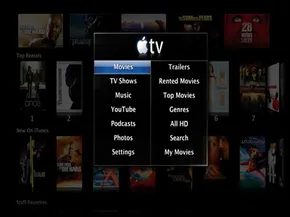
The Apple TV isn’t running standard macOS. It runs a stripped-down version of OS X 10, built specifically to handle graphics and navigation on a living room TV. You navigate this interface using the included remote, clicking through menus to pull audio and video from the device’s internal storage or from iTunes libraries on your network. It’s simple. It’s clean. And for some, it’s frustratingly limited.
Critics attacked the software almost immediately after Steve Jobs unveiled the hardware. The restrictions were glaring. You couldn’t play copy-protected .WMA files from Windows PCs. You couldn’t browse the open web like you would on a desktop. Instead, you were funneled into specific silos: YouTube, MobileMe, or Flickr. If the content wasn’t in those buckets, you couldn’t see it.
The Take 2 Update
Apple listened, or at least pretended to, with the “Take 2” software update in February 2008. This wasn’t a minor patch. It was a fundamental shift in how the device operated.
Before Take 2, you were stuck with the Apple remote. After Take 2, you could swap in almost any third-party universal remote. The update added volume control for audio playback, expanded playlist functions, and enabled features that modern users now expect as basic utilities. You could finally rent movies from iTunes. You could purchase TV shows. You could view photos from MobileMe and Flickr galleries. And crucially, it enabled AirTunes, allowing you to stream iTunes audio through the Apple TV to a home stereo.
The six-button remote that ships with the device still lets you play, rewind, fast-forward, and skip tracks. But why limit yourself to it? Many universal remotes work just as well, letting you control the Apple TV, your DVD player, and your television with one tool. Alternatively, you can install the Remote application from iTunes on an iPhone or iPod Touch. The keyboards on those devices are genuinely useful for tasks like typing search queries into YouTube.
Hacking the Hardware and Software
The moment Apple TV hit shelves, the hacking community went to work. They wanted more. They wanted flexibility. Whether you’re tweaking the hardware to expand storage or altering the software to support new formats, there is no shortage of ways to modify the device.
There is a catch, however. Apple cannot stop you from hacking your Apple TV, but doing so will likely void your warranty. Also, any official Apple updates will strip away your hacked features. You can usually re-apply the hacks, but it’s an extra step that requires patience.
Initial hacks focused on the first-generation Apple TV’s 40GB hard drive. That storage capacity barely held iTunes movies (roughly 1.5GB each) or TV shows (about 500MB each). Advanced users replaced the drive with larger ones. It wasn’t complicated, but it did mess with the device’s aesthetics. This was just the beginning. Sites like AppleTV Hacks sprang up, allowing users to trade tips and techniques.
Software Patches and New Codecs
Software hacks are easier for the average user. You don’t need a screwdriver or technical expertise to poke around sensitive components. The “patchstick” method became popular. You download free software from the internet to a USB flash drive, plug it into the Apple TV, and restart the device. The Apple TV then boots from the USB drive, loading the modified software.
Depending on the patchstick version, you gain access to new codecs. These allow the device to play .AVI, .WMV, and other popular video formats that Apple’s original software ignored. You also gain enhanced networking capabilities.
XBMC and Boxee
Some hacks open the door to a broader internet ecosystem. Tools like XBMC and Boxee let you access a wide array of online content. These modifications are popular because they bypass the format restrictions of the stock software.
Boxee, in particular, gained traction. It combines social interaction with multimedia power. You need to register for an account to use it. Once you do, the interface lets you share opinions on content with other users. It allows you to stream Netflix videos. It turns the Apple TV from a passive media player into an interactive hub.
The Copyright Conundrum
Here is the problem. From the standpoint of Apple and copyright holders, these hacks are dangerous. Users can play just about any content they want. This includes pirated videos and audio.
It’s a direct blow to Apple’s carefully constructed business model. It also steals profits from the makers of the material. The entire purpose of owning an entertainment system is often to support the creators. Hacking the device undermines that ecosystem.
To learn more about Apple TV and its capabilities, take a look at the links on the next page.
The hardware inside these small black boxes is surprisingly capable. Once you peel back the factory restrictions, you unlock a world of customization that the average user never sees.
This isn’t just about watching videos anymore. It’s about control.
Breaking the Silicon Seal
The first major hurdle is the lack of connectivity. Early models shipped without USB ports. Hardly convenient for a device meant to act as a media hub.
But tech enthusiasts didn’t wait for Apple to fix it. They opened the box.
Tear-downs revealed the internal architecture. The system was there. The port was just missing. Enthusiasts managed to solder USB connectors directly onto the board. This “hack” wasn’t officially supported. It voided warranties. It carried risk.
Yet, it worked.
Suddenly, you could attach a flash drive. You could install custom firmware. You could bypass the walled garden. One guide on Google Code even provided a tool to create a USB creator for the Apple TV. It was messy. It was brilliant.
Beyond iTunes: The Boxee Revolution
Apple’s ecosystem was tight. iTunes was the gateway. If you weren’t in the store, you weren’t in the living room.
Or so Apple thought.
Enter Boxee.
This software didn’t just stream content. It aggregated it. It pulled from blogs, YouTube, Flickr, and more. It turned the Apple TV into a social media dashboard.
“Boxee Makes Your Apple TV Better” — the sentiment was clear across tech blogs in late 2008.
Bill Graham at Apple TV Junkie documented the process. It required jailbreaking the device. It required accepting a new, chaotic interface. But the result was a box that felt alive. Not just a receiver, but a participant in the internet.
Remote Control Chaos
Then there’s the remote.
The original Apple TV remote was minimalist. Sleek. Useful for navigating iTunes. Terrible for navigating Boxee. Or a hacked file system.
David W. Martin at Mac Life pointed out a glaring omission. You needed a universal remote.
Why settle for one clunky plastic wand when you can integrate the whole room?
Using a universal remote changed the dynamic. You stopped thinking of the Apple TV as a standalone gadget. You thought of it as part of the TV’s infrastructure. It blended in. It disappeared into the furniture.
Software Updates: A Double-Edged Sword
Apple pushed updates. Version 2.0 brought rentals. Version 2.3 added support for more remotes and remote music access.
Scott McNulty at PC World noted the improvements. But for hackers, updates were threats.
Each patch closed a door. Each security layer made jailbreaking harder.
Ryan Block at Engadget highlighted the limitations of iTunes rentals. You could watch. You couldn’t keep. You couldn’t transfer. The software enforced this.
So users turned to workarounds.
The Community Keeps It Alive
Sales tripled. Apple announced continued investment. The device was winning.
But the real story was in the forums.
On the Apple TV Wiki, users shared tricks. On Crunch Gear, they debated the best media centers. They weren’t just consumers. They were co-developers.
The hardware was simple. The software was complex. The community was the glue.
Why It Matters Now
You might look at an Apple TV today and see a streamer. A sleek box for Netflix and Disney+.
But remember where it started.
It started as a loophole. A way to bypass DRM. A way to connect USB drives when Apple said no. A way to install Boxee when iTunes wasn’t enough.
The spirit of that experimentation didn’t die. It migrated.
Modern smart TVs have similar restrictions. The same people are finding ways around them. The drive for control remains.
We don’t just