You lock the door. You check it twice. You step back, watching the handle, just in case. Then you run back inside because you’re not sure you actually latched it.
It’s exhausting. And you can’t do it forever. You can’t be in the kitchen cooking dinner and simultaneously watching the driveway for suspicious activity. You can’t be at the grocery store and know if a package was stolen from your porch.
Locks help. Alarms help. Crime stats show they have driven down burglaries. But they aren’t failsafe. A lock can be picked. An alarm can be silenced. If you want actual proof of what’s happening while you’re gone, you need eyes on the ground.
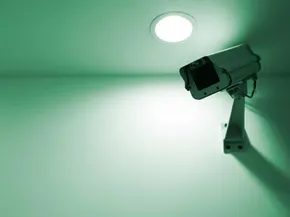
Video surveillance solves the visibility problem. It lets you see what’s happening in real-time or review footage later.
Parents use it to watch sleeping babies, preventing crib falls. Homeowners use it to identify porch pirates. It catches the person breaking in. It catches the person stealing the delivery.
There are two main camps here:
* Visible cameras: Bulky. Obvious. They tell criminals, “We are watching you.” They work as a deterrent.
* Hidden cameras: Tiny. Covert. They catch people off guard.
Before you buy anything, you need to ask yourself some hard questions. What do you actually need to see? How far away? In the dark?
The market is crowded. The options are endless. Picking the wrong setup wastes money. Picking the right one saves your sanity.
Types of Security Cameras
Not all cameras are created equal. A camera meant for a living room won’t work well on a backyard fence. Here is how they break down.
1. Dome Cameras
These are the classic “bulb” shape found in parking lots and stores.
* Pros: Hard to tamper with. Wide field of view.
* Cons: Can be easily spotted. Hard to tell which way they are pointing.
2. Bullet Cameras
Long. Cylindrical. Pointed.
* Pros: Great for long distances. Easy to see which direction they are facing.
* Cons: Vandal-proof features vary. Look more “security-focused,” which might annoy neighbors.
3. PTZ Cameras (Pan-Tilt-Zoom)
Remote controlled. They move.
* Pros: One camera can cover a large area by moving around. Zoom in on details.
* Cons: Expensive. Complex setup. If it’s offline, you see nothing.
4. IP Cameras vs. Analog
This is the biggest technical split.
* IP Cameras: Use internet protocol. High definition. Smart features (motion detection, email alerts). Harder to set up.
* Analog Cameras: Use coaxial cable. Lower resolution. Simpler. Cheaper. Harder to upgrade.
5. Wireless vs. Wired
- Wired: Reliable power. No battery changes. Messy installation.
- Wireless: Easy install. Battery life matters. Can drop connection if Wi-Fi is weak.
6. Indoor vs. Outdoor
- Indoor: Focus on detail
Deciding on a security camera system starts with a simple question: what are you trying to see? And more importantly, how?
The first variable is scale. You might only need to cover a single nursery or living room. In that case, one unit does the job. But if you need eyes on the front door, the backyard, and the garage? You’re looking at a multi-camera setup. The scope of your monitoring needs dictates the size of the system.
Then there’s the connection type. Wired or wireless? This isn’t just about convenience; it’s about signal integrity and stealth.
Wired cameras generally offer superior image quality. Why? Because the video data travels through a physical cable, not through the air. There’s no interference. But installing them is harder. You have to route cables. Stray wires are visible, which ruins any attempt at a discreet installation. You’re trading stealth for stability.
Wireless systems offer flexibility. You can move them around. But they suffer from two major flaws.
First, interference. Your Wi-Fi router. Your cordless phone. That baby monitor in the next room. All of these broadcasts can interrupt the camera’s signal, causing lag or dropped frames.
Second, security. If you go wireless, your video feed travels over the air. Is it encrypted? If not, anyone with a cheap receiver nearby could potentially intercept your footage. Imagine someone watching you come and go. That defeats the entire purpose of security.
Check with the manufacturer. Ensure their wireless protocol includes encryption. Don’t assume it’s standard.
Size matters, too. Large cameras are visible. That’s a feature, not a bug. A big lens on the porch tells intruders they’re being watched. It’s a deterrent.
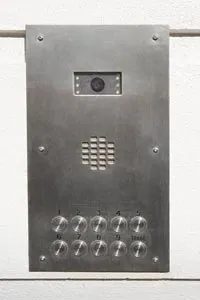
But some people want hidden cameras. You can buy tiny units disguised as alarm clocks, smoke detectors, or intercoms. Pinhole cameras fit into small spaces. They’re hard to spot.
Before you drill into a wall or hide a lens in a clock, stop. Legality is the next hurdle.
Video surveillance laws vary by state, but the federal baseline is strict. You cannot record audio without consent in most jurisdictions. Recording video is trickier. In many places, you can record in areas where you have a reasonable expectation of privacy only if you post signage.
If you install a hidden camera in a room where guests or family members expect privacy, you’re breaking the law. If someone finds it and wasn’t warned, you could face criminal charges. It doesn’t matter if you own the house. Privacy laws apply to everyone inside it.
Installing Security Cameras
Planning the physical placement is where the theory meets the wall.
1. Map Your Zones
Don’t just pick a spot because it looks good. Pick a spot because it covers a choke point.
– Entryways: Front door, back door, garage door.
– High-Value Items: Living room with TVs, office with laptops.
– Blind Spots: Hallways connecting bedrooms, basement stairs.
2. Choose the Right Height
Eye level is the wrong height. Most people look down when they walk through a door. Place the camera higher. Four to eight feet off the ground is standard. This gives you a clear view of faces and avoids blind spots under chins or hats.
3. Check the Power Source
Wireless cameras still need power. If you don’t have an outlet nearby, you’re relying on batteries.
– Battery Life: Check the specs. Some last six months. Others last two weeks.
– Charging Access: Can you reach the camera to swap batteries? If it’s on a high eaves or inside a attic corner, you might be climbing a ladder every month.
4. Wi-Fi Strength Matters
For wireless cameras, signal strength is everything.
– Test Before You Mount: Use your phone to check the Wi-Fi signal at the proposed spot. If it’s weak there, it’ll be worse through a wall.
– Use Extenders: If the signal is poor, install a Wi-Fi extender closer to the camera location. Don’t skip this. Dropping frames ruins the utility of the system.
5. Angle and Field of View
Most cameras have a fixed field of view.
– Wide Angle: Catches more

Camera Placement and Legal Compliance
Even with the perfect zone identified, a botched installation renders the hardware useless. If you aren’t comfortable with electronics, hire a pro. Legitimate surveillance providers don’t just drop a box; they ensure the system functions and, crucially, operates within the law. DIY? Fine. Many setups are plug-and-play, but you must follow the manual. Deviate, and you get nothing.
Optimal Positioning and Weatherproofing
Lens placement dictates success. Distance matters. You need the subject in focus. Mount it to a wall or structure? Secure it tightly. Vibration distorts video. It’s basic physics.
Outdoor cameras serve a dual purpose. They deter break-ins and cover wide areas. But exposure to the elements is real. You need a weatherproof casing. Tough housing prevents tampering too. Vandalism happens. Hardened cases stop it.
Recording Strategies: Continuous vs. Motion-Activated
Do you need a permanent record? It depends on your goal.
Watching kids play? Monitoring the front door? A live feed might be enough. No storage needed.
Want historical data? You need a compatible recording system.
Options vary. Some people use VCRs. Obsolete, but functional. Others route everything through a computer for digital storage. More flexible.
To save space, consider motion detection. The system stays dormant until movement triggers it. This avoids wasting hours of empty footage.
Choosing the Right Fit
There’s no single “best” surveillance setup. It’s about fit. Your needs dictate the method. Know how you want it to work before you buy.
For deeper dives into spy tech, check the linked resources.
Related Articles
- How iCache Works
- How Spy Gear Works
- Top 5 Car Gadgets
- 5 Extravagant Car Amenities
- How accurate are gas mileage monitors?
More Great Links
- The International Spy Museum
Sources
- Garcia, Anna. “‘Spying’ made easy.” NBC. Dec. 1, 2008. (Dec. 15, 2008) http://www.wjhg.com/home/headlines/35315784.html
- Lowe’s Buying Guide. “Select and install a security camera.” (Dec. 15, 2008) http://www.lowes.com/lowes/lkn?action=howTo&p=BuyGuide/Security_cameras.html
- MES Innovations. “Introduction to the wireless video transmitter.” 2005. (Dec. 15, 2008) http://www.mesinnovations.com/devices/rfwireless.html
- Video Surveillance. “Video surveillance and security camera information and resources.” (Dec. 15, 2008) http://www.videosurveillance.com/