



A printer is an output device that turns digital data, like text, images, or photos, into physical output. It fixes information onto paper using toner powder or liquid ink. The first of these machines appeared in the late 1950s and early 1960s. Since then, the technology has branched out into a massive market with a dizzying array of systems.
How to Choose the Best Printer for Your Needs
The market is saturated. You can buy a basic unit for under $50 or a high-end industrial machine for thousands. To cut through the noise, you have to look at specific factors before you hit “buy.”
Key decision points include:
– Technology type (Laser, Inkjet, or Tank)
– Initial cost vs. long-term running costs
– New vs. refurbished units
– Print resolution and paper size (A4 vs. A3)
– Usage volume (home office vs. heavy commercial use)
– Portability requirements
– Supply availability (original vs. compatible cartridges)
The first question is simple: what is this machine actually for? Is it for a home user printing occasional homework, or a business printing thousands of pages a week? The answer dictates whether you need a laser system for speed or an inkjet for photo quality.
Price is a double-edged sword. The cheapest printer on the shelf is often a trap. It might lack the features you need, or the ink costs will eat up the savings within months. If you are looking to save money, consider buying a refurbished brand-name printer. Just make sure the seller has cleaned and overhauled the unit. It saves resources and keeps the cost down.
Why Cheap Printers Can Cost You More in the Long Run
Low upfront cost is not the only metric. You have to calculate the total cost of ownership.
- Volume matters: If you print a lot, a cheap printer with expensive ink is a bad deal.
- Quality needs: Do you need crisp text, or do you need high-resolution photo prints?
- Size constraints: Is A4 enough, or do you need A3 capability?
- Mobility: Do you need to move the printer around, or is it staying in one spot?
The cost of consumables is the hidden killer. Original ink and toner can be expensive. A viable alternative is using compatible products (non-original cartridges). These can significantly lower your per-page cost.
A cheap printer that uses expensive, proprietary ink is often more expensive to run than a mid-range machine with affordable compatible supplies.
The technology itself changes the game. Laser printers use toner powder, which is great for text and dry fast. Inkjet uses liquid ink, which is better for photos but can dry out if you don’t print regularly. Tank systems offer a middle ground, refilling large reservoirs instead of swapping cartridges. Each has a different sweet spot.
Are you buying for today, or for the next three years? The difference shows up in your bank account.

How compatible cartridges actually work
You are buying a third-party clone. Not the brand name box from HP, Canon, or Brother. A compatible cartridge is manufactured by an independent company that reverse-engineers the original design. They get it as close to the factory spec as possible, but patent laws prevent a 100% identical copy. The physical shape, the chip, the ink formulation, the toner particle size. It is a replica built for compatibility, not originality.
So why do people switch? Cost. And quality.
Reputable sellers stand out because of independent certifications and piles of positive customer reviews. These are not the shady marketplace listings you see floating around. Serious vendors offer reliable stock, competent customer service, and hefty warranties. If you are hunting for compatible toner and printer cartridges to reduce costs, this is where you start. You want a supplier who knows what they are shipping and will back it up if a jam happens or a page comes out streaked.
Understanding the ink and toner differences
The terminology gets messy, so let’s break it down.
Toner is for laser printers and photocopiers. It is not liquid, even though it looks like it. It is fine powder made of microscopic particles that flow like a liquid. There are three main types:
- Single-component toner: One cartridge per color. This is what most home and small office laser printers use.
- Two-component toner: The developer (like iron particles) and the toner are kept separate inside the machine. You see this in large copiers and digital press machines.
- Liquid toner: A transfer fluid with tiny, unsolved color particles. It delivers very high print quality.
Color laser printers have become affordable, and compatible toner cartridges for these systems are significantly cheaper than the originals.
Ink cartridges belong in inkjet printers. These are containers filled with liquid printer ink. The ink is a mix of color pigments, binders, and other auxiliary materials. In most inkjet models, the print head is integrated directly into the cartridge. When the ink runs out, you throw away the head too. Compatible ink cartridges are much cheaper than OEM versions and, according to current market data, do not suffer from quality losses.
The biggest misconception: “Cheap” usually means “bad.” In the compatible market, the mid-tier options often rival the original print quality while costing half as much.
Tank systems for high-volume printing
Not all printers use cartridges at all. Some use tank systems.
An inkjet printer with a tank system has no compartment for swapable cartridges. Instead, it has an integrated reservoir. You fill it with bottle ink. It lasts a long time. You can also find laser printers with toner tanks instead of toner cartridges.
This changes the economics of printing. If you print hundreds of pages a week, swapping out cartridges every few weeks gets expensive and annoying. Tank systems fix that. You can buy bottle ink or refill toner as compatible products for these machines. The total cost of ownership drops dramatically. If you are a heavy user, this is the setup to look for. It minimizes per-page costs and reduces waste.
The trade-off? You are locked into specific bottle or refill sizes. But if you are printing a lot, that is a small price to pay.

Comparing inkjet, laser, and LED printer technology for home and office use
The hardware differences go deeper than the label on the box. How the machine actually transfers pigment or toner to paper dictates the monthly cost, the durability of the output, and whether you’re better off with a dedicated unit or a bulky all-in-one.
Inkjet printers remain the default for many households because the entry price is low. The mechanism is straightforward: a print head sprays microscopic droplets of liquid ink from cartridges onto the paper. It works, but the economics are punishing. Cartridges dry out and cost a fortune. Modern variants with refillable tanks solve the cost issue, making them viable for small offices that need color. If you print rarely, though, the ink dries in the nozzle, and you’re stuck replacing the head.
Laser printers flip the script. They are electrophotographic devices. A laser beam charges a photoconductor drum, which then attracts toner (dry powder). Heat and pressure fuse that powder to the paper. The result is crisp, smudge-proof text. The upfront cost has dropped significantly, and color laser units are now common in homes. The toner yield is massive compared to ink, so the cost-per-page plummets. This is why you see them in every corporate office.
How LED printers differ from traditional laser systems
LED printers look like laser printers from the outside, but the light source changes the engineering. Instead of a spinning laser beam, a strip of light-emitting diodes (LEDs) exposes the drum.
Why does this matter? The LED array is static and compact. The printer gets smaller. The toner consumption stays low, and print quality remains high. There is a catch for photographers. If you want archival-grade photo prints, you need a high-resolution LED unit. Standard resolution will show banding. For general documents, though, they are efficient and cheap to run.
When to use dot matrix and thermal printers
Nadeldrucker (dot matrix) is the dinosaur that refuses to die. It uses a ribbon and a row of pins to hammer characters onto paper, much like a typewriter. It is loud, slow, and low-resolution. It survives in clinics because it can print carbon copies. If you need a receipt with three physical copies, this is the only tool that does it reliably.
Thermal sublimation printers are a different beast. They use heat to vaporize dye from a ribbon and bond it to the substrate. You need special thermal paper. It is fragile; it yellows in the light. But it is compact and mobile.
This technology powers the little photo printers that snap onto your phone. It also runs the receipt printers at the supermarket. The paper is cheap, and the printer is simple. Just don’t expect the printout to last a decade.
The rise of 3D printing and multifunction devices
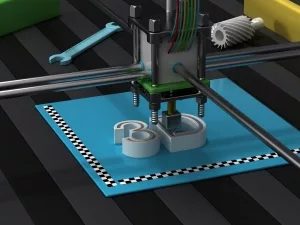
3D printers have moved from research labs to garage workshops. They extrude molten plastic, usually PLA, ABS, or Nylon, through a nozzle that moves horizontally and vertically. The nozzle builds the object layer by layer. The key requirement is precise movement. If the head doesn’t move smoothly, the print fails.
This isn’t just for industrial prototyping. Hobbyists build models, and researchers use them for physical simulations. The materials are becoming easier to find, and the machines are affordable for private use.
Multifunction devices (MFDs) combine the chaos. They merge a scanner, fax, copier, and printer into one chassis. You can get them with laser, inkjet, or tank systems. The logic is space and price. Buying four separate machines costs more and takes up more desk space.
For a household that scans documents regularly and prints occasionally, an MFD is the logical choice. It saves money upfront. It saves square footage. It keeps the workflow in one place.


