Your digital life is tied to your Facebook account. Photos. Messages. Memories. When a hacker takes over, it feels like someone broke into your house and started tossing things around. The panic is real. But before you spiral into despair, know this: you likely still have a shot at getting it back. Facebook provides specific channels for recovering compromised accounts. You just need to know which button to press and what information to have ready.
Let’s cut the fluff. Here is how you actually regain control.
Initiate the Recovery Process
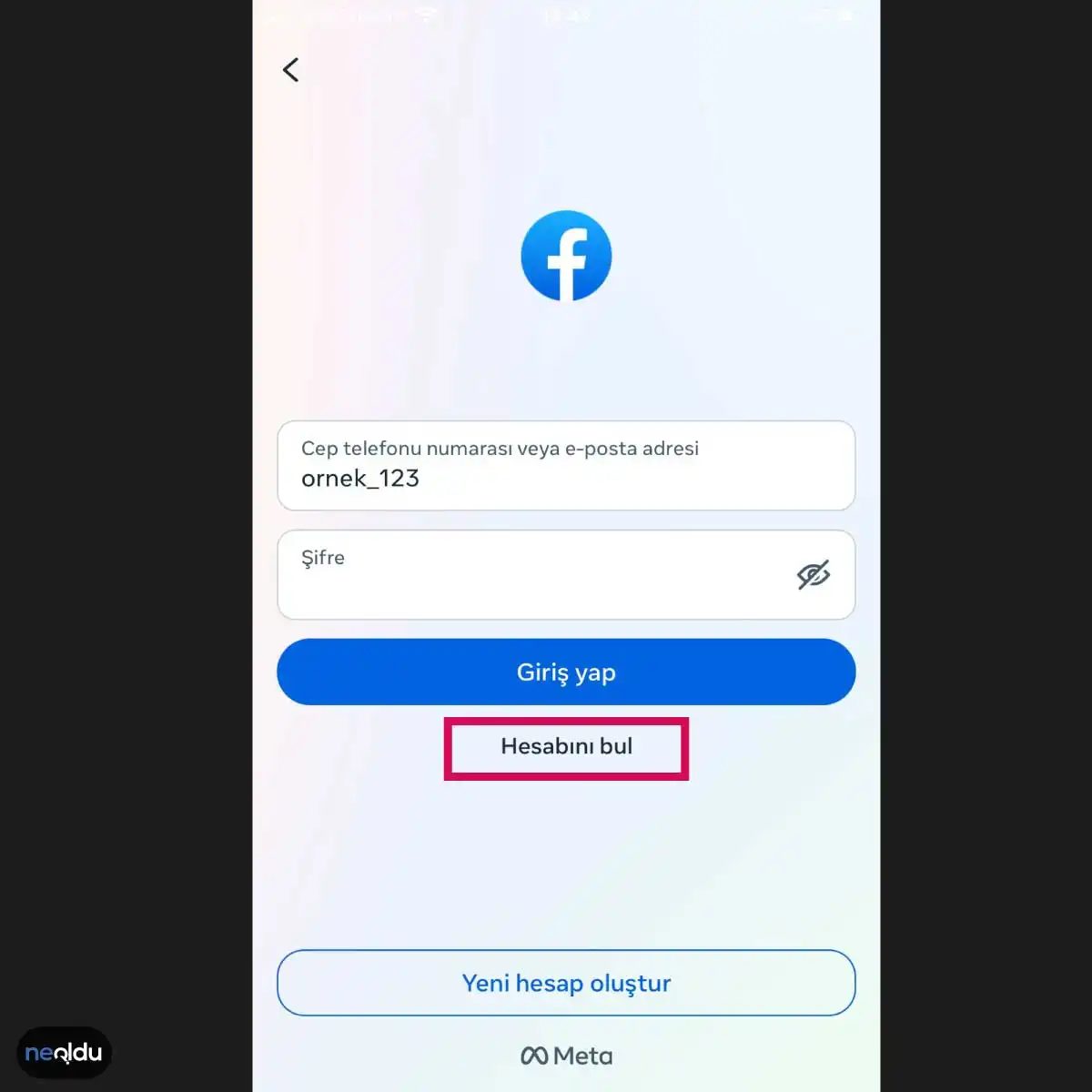
The first and most critical step is simple. Go to the Facebook login page. Do not try to guess your way in by entering random passwords. That triggers security alerts and locks you out further. Instead, look for the “Find Your Account” link. It is usually tucked away under the password field. Clicking this starts the official recovery protocol.
Facebook will ask you to search for your profile. Enter your email address, phone number, or username. If you don’t remember the exact username, try your full name. The system might show you a list of matching profiles. Select the one that belongs to you. This ensures the recovery instructions go to the right place.
Verify Your Identity
Once you’ve selected your profile, Facebook needs to prove you are who you say you are. They will offer options to send a code to your trusted email or phone number. Did you have a secondary phone number linked? Use it. If your hacker changed the email and phone number, you are in a tougher spot. But you still have options.
Look for the “No longer have access to these?” link. This opens a different verification flow. You might be asked to:
- Upload ID: A driver’s license or passport that matches your profile name.
- Confirm Login Details: Information you knew before the hack.
- Trusted Contacts: If you set up trusted friends previously, they can provide recovery codes.
“Facebook’s verification process is strict by design. They want to ensure you are the original owner, not the current hacker.”
What If You Can’t Access Your Email or Phone?
This is the nightmare scenario. The hacker changed everything. You get locked out of the recovery emails and texts. Here, you have to rely on Facebook’s “Account Recovery” form. You will need to provide:
- The email or phone number you used to own the account (even if the hacker changed them).
- Your current email address, so Facebook can contact you.
- Any other details that prove your identity.
This process is slower. It involves manual review by Facebook’s security team. Patience is not just a virtue here; it’s a requirement. Do not spam the form. Submitting multiple times can flag your request as suspicious.
Check for Secondary Verification Methods
Did you enable two-factor authentication (2FA) before the hack? If so, and you saved the backup codes somewhere safe, you can use those to log in directly. It bypasses the need for email or SMS verification. It also allows you to change the hacker’s information before they can stop you.
If you didn’t save backup codes, check your browser history. Sometimes, your computer still remembers a logged-in session. You might be able to
İlk adım her zaman aynı: “Hesabımı Bul” seçeneğine tıklamak. Bu, Facebook’un size uzanan ilk eldir. Basitçe, o mavi butona basarak sistemi harekete geçirin. Sonra ne olacağını biliyor musunuz? Sistem, sizi doğrulamak için bir soru sorar.
Telefon Numaranız veya E-posta Adresinizi Doğrulayın
Artık Facebook’a kim olduğunuzu kanıtlamanın zamanı. Sistemden istenen tek şey, hesabınızla ilişkili bir iletişim kanalı. Yani ya cep telefonunuz ya da e-posta adresiniz.
Hangisini kullanacağınız, hesabınızı kaybetme nedeninize göre değişir. E-posta erişiminiz koptuysa, telefon numaranız kurtarıcınız olur. Tam tersi de geçerli. Hangisi aktifse, o yol seçilir.
“Facebook’a bağlanmak için bu adrese gönderilen bir doğrulama kodu girin.”
Bu ekran sizi biraz gerdirir. Kodu girmeden önce, önceki adımlarda doğru bilgiyi girdiğinizden emin olun. Yanlış bir harf, sizi tekrar başa döndürebilir. Sistem sabırlı değildir. Yanlış denemeler, hesabınızı geçici olarak kilitleyebilir. Bu yüzden harf sayımına dikkat edin.
Telefon numarasıysa, SMS gelir. E-postaysa, gelen kutusunu yormadan önce spam klasörünü kontrol edin. Bazen o kurtarıcı kod orada saklanıdır.
Kodu girip “İleri” dediğiniz anda, Facebook artık sizinle konuşmaya başlar. Şifre sıfırlama süreci artık resmiyet kazanır. Ama durun. Şifrenizi değiştirmek kadar basit değil. Sonraki adımlar, hesabınızın güvenlik ayarlarını da gözden geçirmenizi gerektirecek.
Doğrulama Kodunu Bekleyin
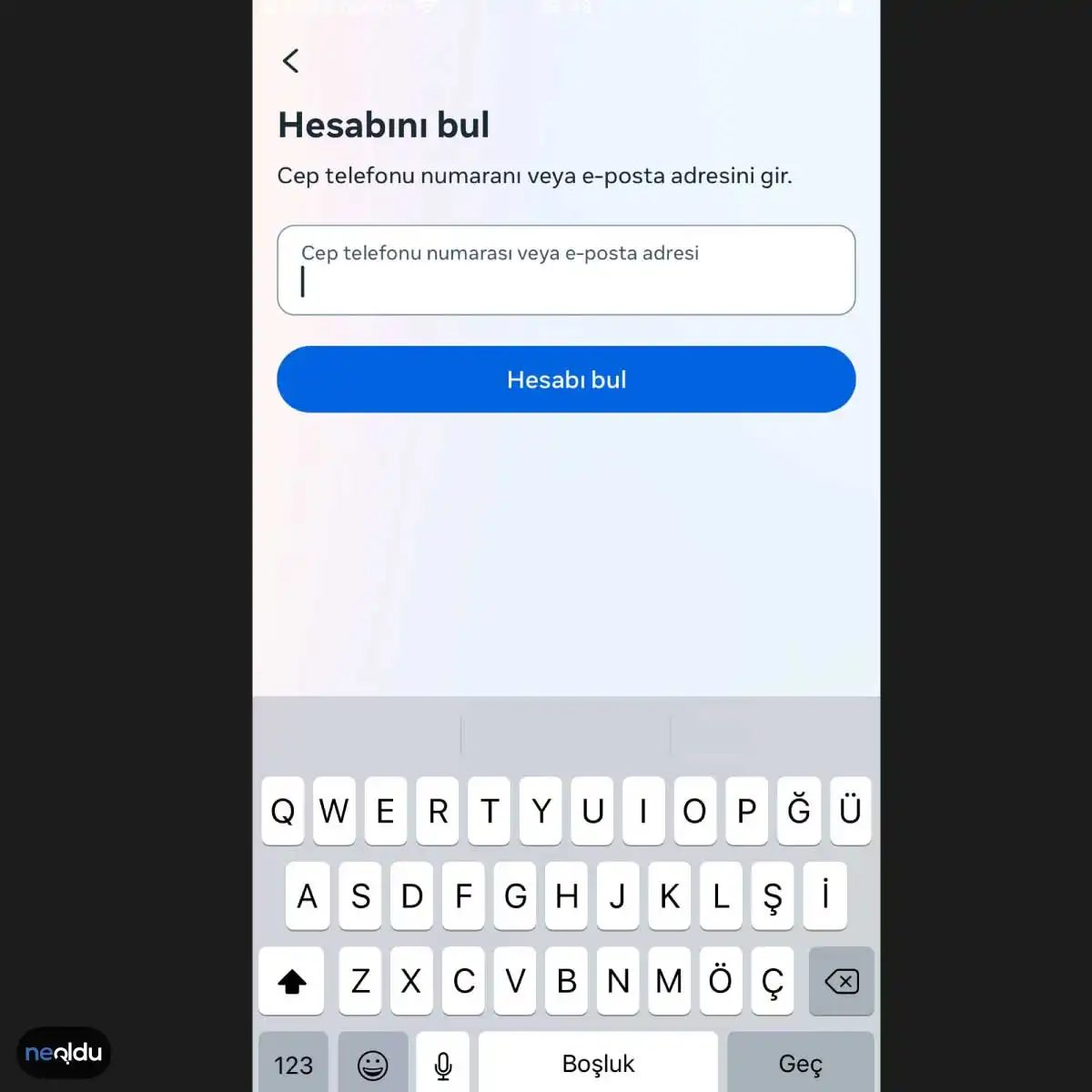
Kontrollü bir alan açılır. İçine ne yazacaksınız? Kayıtlı olan cep numaranız ya da e-posta adresiniz. Sadece bunlar kabul edilir. Başka hiçbir şey işe yaramaz.
Bu adım basit. Ama kritik.
Numaranızı veya maili girdikten sonra bir bekleyiş başlar. Facebook bunu doğrulamanıza çalışır. Sistem, size bir kod gönderir. Ya SMS olarak. Ya da e-posta olarak. Hangisini seçtiyseniz, o kanaldan gelir.
Kodu Doğrulayın
E-postanızı kontrol edin. Gelen kutusu dolu mu? Spam klasörüne bakmak akıllıca. Bazen otomatik filtreler bu tür kodları oraya hapseder. SMS geliyorsa, telefonunuzun bildirimlerine göz atın.
Kodu kopyalayın. Doğrulama kutusuna yapıştırın.
Bu adım, hesabınızın gerçekten size ait olduğunu kanıtlamanın tek yoludur. Şifrenizi hatırlamıyorsanız bile, bu iki adımdan biri (telefon veya mail) kapıyı açar.
Eğer kod gelmiyorsa ne olur? Beklemek çözüm değildir. “Kodu tekrar gönder” butonuna tıklayın. Bazen ağ gecikmeleri yaşanır. Bazen operatörler SMS’leri geciktirir. Sabırlı olun. Tekrar deneyin.
Doğru kodu girdiğinizde, şifre sıfırlama ekranına yönlendirilirsiniz. Artık yeni bir şifre belirleyebilirsiniz. Eski şifrenizi unutmuşsanız, bu size ferah bir nefes aldırır.
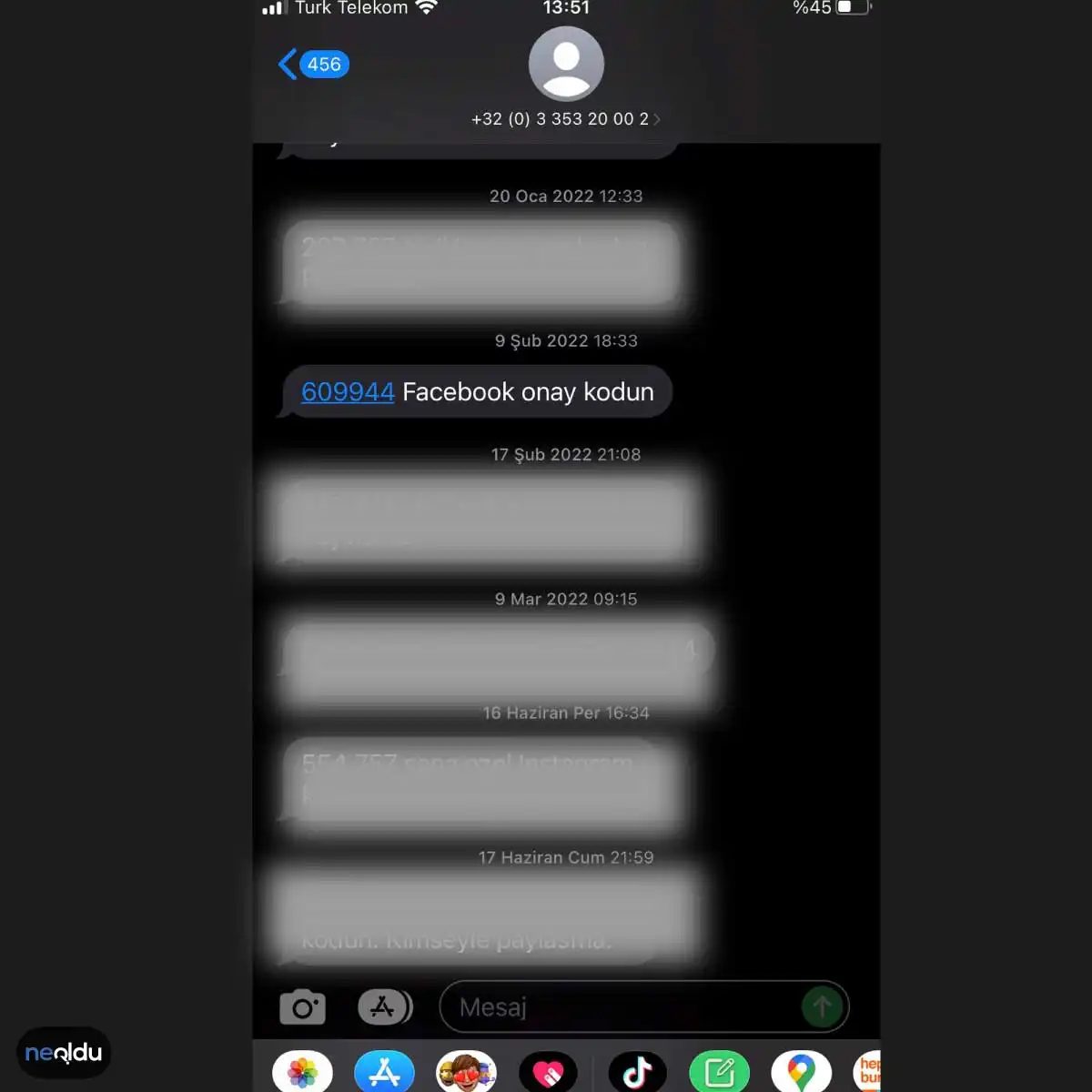
Kod gelmedi mi? Ya da yanlış girdiniz mi? Durum kritik. Facebook, girdiğiniz verilerle eşleşen bir onay kodu gönderir. Bunu ilgili alana tam olarak girmelisiniz. Eksik rakam. Fazla karakter. Hatalık. Hiçbiri kabul edilmez. Sisteminiz sizi hemen dışlar. Şifre yenileme talebiniz reddedilir.
Görsellerdeki kodlar sadece örnek. Temsilidirler. Sizin telefonunuza gelen, gerçek, anlık SMS doğrulama kodu budur. Onu girmeniz şart. Yoksa kapı kapalı.
4. Destek Ekibiyle İletişime Geçin
Eğer kod gelmiyorsa, spam klasörüne bakın. Ya da şebeke sorununuz varsa. Ama bazen sistem hata yapar. O zaman tek çare: Facebook destek hattı.
Nasıl ulaşılır? Uygulama üzerinden “Help Center” sekmesi. Web sürümünde “Report a Problem”. Sorununuzu açıklayın. Ekran görüntüsü ekleyin. Telefon numaranızın son dört hanesini belirtin. Doğrulama süreci neden takıldığını onlar bilir.
Acil mi? Hesabınız kilitli mi? Sabırlı olun. Süreç yavaş ilerleyebilir. Ama çözülür.
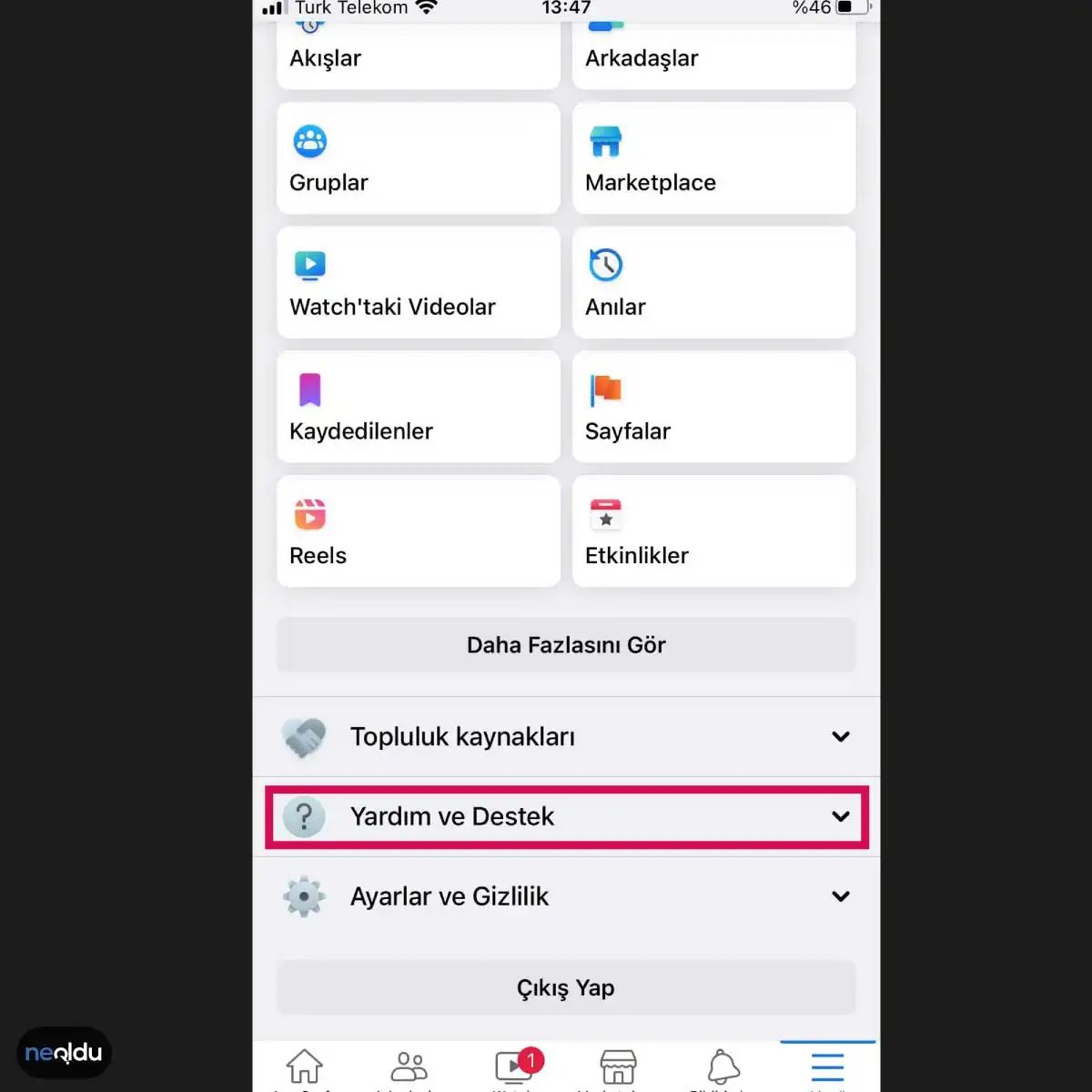
Hesabınızı Geri Almak İçin Destek Ekibine Ulaşın
Adımları denediniz, kimlik doğrulamasını yaptınız ama hala dışarıdasınız. Hemen Facebook Destek Ekibi ile iletişime geçin. Bu ekip, çalınan hesapları kurtarmak için tasarlanmış kanallara sahiptir.
Destek talebinizi göndermenin en net yolu, Facebook’un “Yardım ve Destek” veya “Destek Merkezi” bölümlerini kullanmaktır. Burada doğrudan sorunuzu iletebilirsiniz.
Şunu unutmayın: Kanıt sunmanız şart.
Kimlik bilgilerinizi doğrulayacak belgeler hazırlayın. Hesabınızın çalındığına dair somut kanıtları da ekleyin. Bu belgeler, kim olduğunuzu ispatlamanız için kritik adımlardır.

Hesap çalındı mı? Panik yapmayın. Önce doğru yere gidin.
Facebook’un resmi hesap kurtarma formu, bu kriz anında sizin en büyük silahınız. Bu araç, hesabınızın ele geçirildiğini kanıtlamanız ve ekibin size ulaşmasını sağlamak için tasarlandı. Basit bir iletişim kanalı değil, sürecin ilk ve en kritik adımı.
Formu Doldurmanın Adımları
İşlemi başlatmak için Facebook Yardım Merkezi’ne erişin. Linkleri aramaya gerek yok. Doğrudan kurtarma sayfasına gidin.
İlk adım teknik değil, lojistik. E-posta adresinizi girin. Bu adres, hesabınıza şu anda erişiminiz olmayan bir adres olabilir. Önemli olan, güvendiğiniz ve düzenli kullandığınız bir mail kutusu olması. Facebook size buradan ulaşacak.
İçeriği doldururken detaylara takılın. Rastgele bilgiler yazmayın. Şunları hazırlayın:
- Hesabınıza verdiğiniz isim.
- Profil URL’niz (facebook.com/kullaniciadi).
- Hesabı açtığınız yıl veya ay.
- Eski e-posta adresleri veya bağlı telefon numaraları.
Bu veriler, algoritmanın “bu kişi gerçekten bu hesabın sahibi” diyebilmesi için gerekli izlerdir.
Alanları doldurun. Gönder’e tıklayın. Sonra bekleyin.
Süreç Nasıl İşler?
Facebook ekibi, formu aldıktan sonra incelemeye başlar. Bu bir robot değil, insanlar. Ve insanlar yavaş çalışır. Süreç birkaç gün sürebilir. Bazı durumlarda hafta bile alabilir.
Sabırlı olun. Sürekli mail atmak süreci hızlandırmaz. Aksine, sistemi yorabilir.
Doğru bilgi vermek, hızın anahtarıdır. Yanlış bir tarih veya eksik bir e-posta, incelemenin reddedilmesi veya ertelenmesi anlamına gelir. Ekibin size daha iyi bir anlayış kazanması için kısa bir açıklama ekleyin. Ne oldu? Nasıl çalındı? Bu detaylar, destek temsilcisini doğru yönlendirmenize yardımcı olur.
Facebook Destek Ekibiyle İletişime Geçmek
Form süreci, tek taraflı bir eylem değil. İletişim kanalı açılır. Facebook size mail atar. Talimatları takip edin. Genellikle yeni bir şifre belirlemeniz veya kimlik doğrulaması yapmanız istenir.
Bu aşamada dikkat edin. Resmi olmayan sitelerden gelen maillere güvenmeyin. Sadece @facebook.com veya @meta.com uzantılı mailleri kontrol edin.
İşlem tamamlanana kadar, hesabınızı korumak için aldığınız önlemleri gözden geçirin. İki faktörlü doğrulamayı etkinleştirin. Şifrenizi güçlendirin. Unutmayın, kurtarma sadece başlangıçtır.

When Self-Service Fails: Contacting Facebook Support Directly
You’ve locked yourself out. The password reset link didn’t work, the two-factor authentication codes are gone, and the automated recovery flow has looped you back to the start. At this point, trying to outsmart an algorithm is useless. You need a human. Or at least, a dedicated support team that can look past the bot checks.
If standard recovery methods have failed you, reaching out to the Facebook Support Team is your last resort. This isn’t just about complaining; it’s about triggering a manual review that can verify your identity in ways the system can’t. They have the tools to restore access, but they require proof.
Navigating the “I Can’t Access My Account” Form
The most reliable path isn’t a direct email line—Facebook doesn’t really have one for consumers. It’s a specific funnel within the Help Center.
Go to the Facebook Help Center. Look for the section dedicated to account recovery. You’ll see a link that says “I Can’t Access My Account”. Click that. You will be prompted to enter your email, phone number, username, or full name. If you can’t log in to find this, use the “Find Your Account” tool.
Once you identify your account, you’ll hit the recovery screen. Here is the critical step: look for the option that says “Need another way to verify?” or “Get Support” if the standard methods fail. In some interfaces, this is buried under “I don’t have access to this email or phone number” or simply “Another Problem?”
Fill out the form. And I mean really fill it out. Don’t just type “help.”
What to include in the form:
* The email or phone number originally linked to the account.
* Approximate date you created the account.
* Previous passwords you remember using.
* Devices and browsers you typically use to log in.
* IP address if you know it (you can check this via Google “what is my ip”).
* Proof of identity: If asked, be ready to upload a government ID. Note: Facebook is strict about this. Ensure your name matches the account, or the request gets rejected.
“The more accurate data you provide, the faster the support team can validate your ownership. Vague requests get queued; detailed ones get processed.”
The “Connect with Support” Alternative
There is a more direct, albeit slower, route for some users. Inside the Facebook Help Center, navigate to the Support Services section. Look for a button labeled “Get Support” or “Contact Us” (sometimes phrased as “Connect”).
Clicking this often initiates a ticket system. You can describe the issue in plain English. “My account was hacked, and I’ve lost access to my recovery email.” Be specific. Mention if the attacker changed your password or email.
This method can speed up recovery because it flags the account for a priority review. However, don’t expect an instant reply. It might take longer than the automated forms because it enters a different queue.
Patience is Part of the Process
Here’s the reality check: Facebook Account Recovery is not instant. Even


Recognizing Unauthorized Access to Your Facebook Account
You know the drill. Strong password. Change it every few months. Two-factor authentication? You’re already ahead of 80% of users. But technical hygiene only gets you so far. Sometimes, despite your best efforts, someone else is sitting behind your login screen. The clock starts ticking the second they get in. And you won’t know they’re there until it’s too late.
So, what does a compromised account actually look like? It’s rarely a dramatic red alert. It’s subtle. It’s the quiet wrongness of your digital footprint shifting without your consent.
The Password Flip
This is the most obvious red flag. You try to log in one morning. Nothing. “Incorrect password.” You reset it. You check your email. Did you authorize this change? If the answer is no, the game is over. You’ve been locked out. The attacker changed the credentials to ensure you can’t get back in easily. This isn’t a glitch. It’s a siege.
Contact Info Hijacked
It goes deeper than just the password. Attackers often update the recovery email and phone number attached to your profile. Why? To prevent the automatic password reset flow from sending a recovery link to you. If you notice your primary email address or linked phone number has changed in your account settings, assume the worst. They’ve cut your lifeline.
Anomalous Activity
Look at your activity log. Not the feed. The log. Are you seeing messages sent to friends that you never wrote? Posts shared at 3 AM when you were asleep? Friend requests sent to strangers? Even “likes” on pages you don’t follow? This is social engineering in motion. The attacker is using your credibility to spam your network. If your friends are asking, “Why did you send me this link?” you’ve already lost.
Sudden Suspension
Sometimes, the platform detects the breach before you do. Your account gets disabled. The reason? “Suspicious activity” or “violating community standards.” Often, the attacker is posting spam or scams, triggering Facebook’s automated flags. A suspended account is a silent scream. It means the attacker overplayed their hand.
Any of these signs demand immediate action. Don’t wait. Don’t panic. But move. If you suspect your account is compromised, the next step isn’t just changing a password. It’s a full forensic recovery.
Resetting Passwords and Utilizing Recovery Options
If you haven’t been completely locked out yet, or if you’re in the process of regaining access, the mechanics of recovery are specific. Facebook offers a few pathways, but they aren’t equally effective.
The Standard Password Reset
If you still have access to your original email or phone number, go to the login page. Click “Forgotten Password?” Enter your username or email. You’ll get a code. Enter it. Create a new password. Not a variation. A completely new string. Use a password manager. Generate something random.
The Trusted Contacts Method
This feature is less common now, but still relevant for some legacy accounts. You pre-selected three to five friends who could give you a code to regain access. If your password is changed and you don’t have access to your recovery email, these contacts can help. They receive a code from Facebook, which

Recovering a Hijacked Facebook Account
If your account is compromised or locked out, don’t panic. Facebook provides a structured path back to ownership, but the steps differ depending on whether you still have some access or are completely shut out.
The immediate priority is always changing your password if you can still log in. This is the fastest way to cut off the attacker. If you are locked out entirely, the process shifts to account recovery via password reset.
Resetting Access Without a Password
When you cannot access the main dashboard, Facebook offers multiple verification channels to prove you are the owner. You aren’t stuck with just one method.
- Email Recovery: Request a secure link sent to the email address registered to the account. This is often the fastest route if the inbox is still accessible.
- Phone Number Verification: Use a linked mobile number to receive an SMS code. This is particularly useful if the email address has been changed by the hijacker.
These options exist because hackers often update contact details to prevent the original owner from regaining control. If your primary email has been replaced, the phone number verification becomes critical.
Advanced Account Recovery Steps
Standard resets aren’t enough in complex cases. Facebook’s account recovery system includes deeper verification layers designed to thwart sophisticated takeovers.
One powerful tool is friend assistance. The system can contact trusted friends who will provide you with a unique confirmation code. This leverages social graph data, making it harder for an attacker to replicate your connections.
Another layer involves sending a verification code to a previously registered phone number. Even if the current number is unknown to you, the system may recognize historical data associated with your profile.
“Account recovery options are highly effective for restoring control, but they require active participation from trusted contacts or historical device data.”
Auditing Security Settings
Once access is restored—or even while attempting to recover it—you must audit your security settings. Hackers often leave backdoors open.
Check the Where You’re Logged In section immediately. This list shows all active sessions across devices. If you see an unknown laptop in another country, log it out instantly. This action forces a re-authentication for all devices, kicking out the intruder.
You should also review Trusted Contacts. These are the friends who can help verify your identity if you lose access again. Ensure the list contains people you still interact with regularly.
Finally, enable two-factor authentication (2FA) if it isn’t already active. This adds a second layer of security, requiring a code from an authenticator app or SMS in addition to your password. It prevents unauthorized logins even if your password is stolen.
The recovery process can be slow. Facebook may take days to verify your identity through these steps. Patience is required. But the system is designed to prioritize the original owner over the hijacker. Once you’re back in, change everything. Passwords, email addresses, and phone numbers linked to the profile. Don’t assume the threat is gone just because you’ve logged back in.


How Long Does It Actually Take to Recover a Stolen Facebook Account?
The timeline for getting your account back is rarely uniform. You might regain access in minutes. Or you could wait days. It depends entirely on the method you choose and how fast Facebook’s support infrastructure responds.
If your password was changed without your permission, or if someone else altered your security settings, you need to act quickly. Resetting the password is the first line of defense. Complete these steps rapidly, and you might retrieve your account almost immediately. The system recognizes the device or email associated with the original owner. Trust is established quickly.
But things get messy when the hacker has gone deeper. In these cases, recovery takes longer. You are now at the mercy of Facebook’s support team. They review your form. They check your details. This verification process can drag on.
To speed things up, your recovery form must be flawless. Missing a single detail can delay approval. Accuracy matters more than speed here. Ensure every piece of information is current and correct. Facebook needs proof that you are the original owner. If your data is outdated, you will wait longer.
Generally, expect the process to take a few days. Sometimes it goes faster. Sometimes slower. Patience is required. You cannot force their hand. Let the security protocols do their job. Rushing leads to errors. Errors lead to rejection.
How to Prevent Account Theft in the First Place
Prevention is cheaper than recovery. Once an account is compromised, the emotional toll and the time lost are significant. Security isn’t just about strong passwords anymore. It’s about layered defense.
Enable two-factor authentication (2FA) immediately. This adds a second layer of security beyond your password. Even if a hacker steals your credentials, they cannot log in without the second factor. Use an authenticator app rather than SMS when possible. SIM swapping attacks are on the rise. SMS can be intercepted.
Review your active sessions regularly. If you see a login from a device you don’t recognize, log it out immediately. This cuts off unauthorized access before it can do damage. Change your password periodically, especially if you suspect any breach.
Be cautious with phishing attempts. Clicking a malicious link is the most common way accounts are stolen. Verify URLs before entering any information. Facebook will never ask for your password via email or text message. If it does, it’s a scam.
Keep your contact information up to date. If your phone number or email address changes, update it in your security settings. This ensures you receive alerts and recovery links. Old contact info is a liability.
Consider using a password manager. It generates unique, complex passwords for every site. You won’t reuse passwords across different platforms. If one site is breached, your Facebook account remains safe. This simple habit reduces risk significantly.
Set up trusted contacts. Facebook allows you to designate friends who can help verify your identity if you’re locked out. It’s a backup plan for when automated systems fail. It adds a human element to the recovery process.
Stay vigilant. Security is not a one-time setup. It’s an ongoing practice. Monitor your account activity. Report suspicious behavior immediately. The sooner you act, the less damage is done.

Why Prevention Beats Recovery in Facebook Security
Reclaiming a stolen Facebook account is a frustrating, bureaucratic nightmare. Preventing the theft in the first place? That’s where the real work happens. The difference between a locked-out user and a secure one usually comes down to a handful of non-negotiable habits.
The Weak Link: Password Hygiene
A strong password isn’t just a suggestion; it’s your first line of defense. If your password is “Facebook123,” you’re essentially leaving the back door open. Complexity matters. You need a mix of uppercase letters, lowercase letters, numbers, and symbols. But complexity alone isn’t enough if you’re reusing that same password across your email, banking, and social media.
When one site gets breached, the others fall too. Credential stuffing attacks rely on this exact laziness. Create a unique, complex password for Facebook. Then, never reuse it elsewhere.
Two-Factor Authentication: The Safety Net
Two-factor authentication (2FA) adds a critical layer of security. Even if someone steals your password, they can’t log in without the second factor—usually a code sent to your phone or generated by an authenticator app.
This simple step blocks the vast majority of unauthorized access attempts. It forces the attacker to have not just your secrets, but your physical device. Make it mandatory. Don’t skip the prompt.
The Human Element: Don’t Share the Keys
It sounds obvious, but people share credentials. Friends, family, colleagues—don’t do it. Sharing your password, username, or even your email login details gives others direct access. If something goes wrong, you can’t prove it wasn’t you.
More importantly, verify the sites where you enter your details. Phishing sites mimic the real Facebook login page perfectly. If the URL looks slightly off, or the padlock icon is missing, close the tab.
Keeping the Device Clean
Your computer and browser are the windows through which you access Facebook. If the window is dirty, the room gets dirty too. Keep your operating system and browser updated. These updates often include patches for security vulnerabilities that malware exploits to steal cookies and session tokens.
Outdated software is an open invitation for keyloggers and spyware. Update regularly. It’s not just about new features; it’s about closing holes.
The Phishing Trap
Scammers are creative. They send fake links that look like official Facebook notifications. “Your account will be deleted,” or “Someone logged in from a new device.” Clicking these links leads to fake login pages designed to harvest your credentials.
Ignore unsolicited links. Never click a link in an email or message asking you to verify your account. Go directly to facebook.com instead. If you’re unsure about a friend’s request, message them through a different channel to confirm they sent it.
These steps significantly reduce your risk. But no system is impenetrable. If you do lose access, knowing how to recover it is your only backup plan.

Facebook hesabım çalındı mı? Panik yapmayın, ama yavaşlamayın da. Zamanla yarışmak zorundasınız.
İlk hareketiniz net olmalı. Facebook şifrenizi derhal değiştirin. Eski şifreniz artık güvensiz. Yeni şifre güçlü olsun. Tahmin edilmesi imkansız, karmaşık bir yapıda. Sadece Facebook değil, bağlı olan e-posta hesabınızın şifresini de yenileyin. E-posta kurtarma anahtarıdır. Onu kaybederseniz, diğer her şey boşa gider.
Eğer hala erişiminiz varsa, farklı bir cihazdan oturumu kapatın. Hemen. Oturum yönetimi panelinden tüm cihazları zorla çıkış yaptırın. Bu, saldırganı sistemin dışına itmenin en hızlı yolu.
Facebook Hesap Kurtarma Formu Nasıl Doldurulur?
Giriş yapamıyorsanız, tek yol resmi yoldur. Facebook Hesap Kurtarma Formu sayfasına gidin. Bu, Meta’nın hesabınızı size geri vermesini sağlayan tek resmi kanaldır.
Formu doldururken eksik bilgi bırakmayın. İstediğiniz kullanıcı adını girin. İlişkili e-posta adresini ekleyin. Mümkünse kimlik belgenizi yükleyin. Bu belge, kim olduğunuzu kanıtlar. Yüz tanıma özelliği olan bir kimlik varsa daha iyi sonuç verir.
“Facebook, hesabınızın size ait olduğunu doğrulayacak ve size e-posta yoluyla geri dönüş yapacaktır.”
Gönder butonuna tıklayın. Sonra bekleyin. Süreç otomatik değil, elle gözden geçiriliyor olabilir.
Çalındığını Nasıl Anlarsınız?
Hesabınızın çalınmış olduğunu anlamak için şüpheli davranışları takip edin. Giriş yapamıyorsanız, şifre değiştirilmiş demektir. Bu en bariz belirtidir.
Ama daha incelikli durumlar da var. Arkadaş listenizde tanımadığınız isimler görüyor musunuz? Profilinizde garip fotoğraflar veya değişiklikler var mı? Hesabınızdan, siz yapmadan mesajlar veya paylaşımlar mı geliyor?
Bunlar kırmızı bayraklardır. Eğer hesabınızdan bilmediğiniz paylaşımlar veya mesajlar yapılıyorsa, hesabınızın güvenliği konusunda endişelenmeniz gerekiyor olabilir. Hemen harekete geçin. Beklemek, kaybı büyütür.
Kurtarma Süreci Ne Kadar Sürer?
Facebook hesap kurtarmak için ne kadar süre beklemem gerekiyor? Bu sorunun tek bir cevabı yok. Süreç değişkenlik gösterebilir.
Bazen dakikalar alır. Bazen günler. Bazen haftalar. Facebook’un yanıt verme süresi değişebilir. Yoğunluk, şüpheli aktivite düzeyi ve sunulan kanıtlar etkili olur. Hesabın kurtarılması için ek belge veya bilgi talep edebilirler. Bu nedenle sab