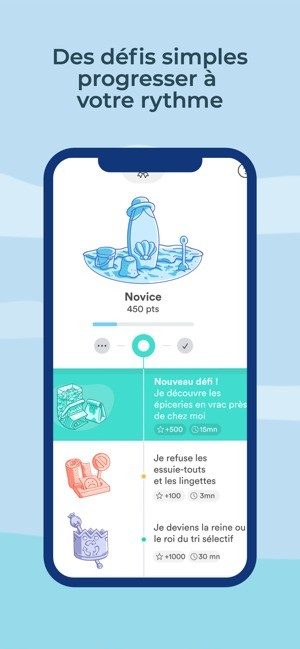
Ocean’s Zero isn’t your typical environmental lecture wrapped in a PDF. It is a gamified mobile application designed to make reducing plastic waste feel less like a chore and more like a competitive, satisfying challenge. The app targets the general public with a free, intuitive interface that turns daily eco-friendly habits into a collective adventure.
The core function is simple. You complete concrete, real-world challenges to lower your carbon footprint. The system adapts these tasks to your specific lifestyle, whether you are a total beginner or someone already practicing zero-waste techniques. It moves beyond generic advice by offering a personalized guide that tracks your progress and rewards consistency.
Does Ocean’s Zero work on desktop?
No. There is no native Windows, macOS, or Linux version. The developers chose to keep the experience strictly mobile-first.
Why? Because plastic waste reduction happens in your pockets, not at your desk. The app is optimized for Android and iOS devices, available for free on the Google Play Store and the Apple App Store. If you need resources while at a computer, the official website provides supplementary content, but the core tracking and challenge system lives on your phone.
How to get started and track your progress
Installation is straightforward. You download the app, create an account with basic information, and you are in. No complex onboarding.
Once logged in, the dashboard organizes challenges into categories. You can set realistic goals based on your current constraints. The app uses online synchronization, meaning your data is saved in the cloud. Change your phone? Reinstall the app? Your progress remains intact.
The system distinguishes itself by combining scientific validation with a reward structure that encourages regularity.
Why this approach sticks
Most environmental apps fail because they are preachy. Ocean’s Zero uses gamification to keep you motivated. You earn rewards for completing tasks. You share successes with a community focused on reducing environmental impact.
The content is verified scientifically, which separates it from vague “green” marketing. It blends education, leisure, and health tips into a single tool. This makes it easier to adopt new reflexes without feeling overwhelmed.
Updates happen automatically through the app stores. If you want to force an update, go to the app page in your store and tap update manually. Your data stays safe.
The real test is not downloading it. It is doing the first challenge tomorrow.
Is Ocean’s Zero really free to use?
Yes. The app has no paywall, no mandatory subscription, and no “premium” tier. You download it, you use the features, you’re done paying.
This matters. Most eco-tools hide their best features behind a $5 monthly fee. Ocean’s Zero doesn’t. Every basic function, every challenge, and every educational pathway is available to anyone. Students, teachers, individuals, and community groups all get the same access. No license key. No credit card.
You might wonder why an app gives away everything. The goal is simple: remove the financial barrier to environmental action. If you can’t afford a sustainability course, you shouldn’t be locked out of learning how to compost or reduce plastic waste.
Can you download older versions of the app?
Not through official channels.
App stores force you to run the latest build. Since the content updates frequently based on user feedback and current environmental news, the developers don’t support rolling back to previous versions.
If you have a specific technical issue with the current update, you can contact the support team. They might offer a workaround. But generally, you’re on the newest version or you’re out.
Does Ocean’s Zero offer official certification?
No formal certificate.
Schools and companies often ask for this. They want a credential to hand out to students or employees. Ocean’s Zero isn’t structured as an accredited course.
However, it is structured as a resource hub. Teachers can pull specific modules for classroom sessions. Community organizations can use the materials to run workshops. The content is updated regularly, so the information stays relevant. You aren’t getting a piece of paper, but you are getting a toolkit for running effective awareness campaigns.
How does the gamification actually work?
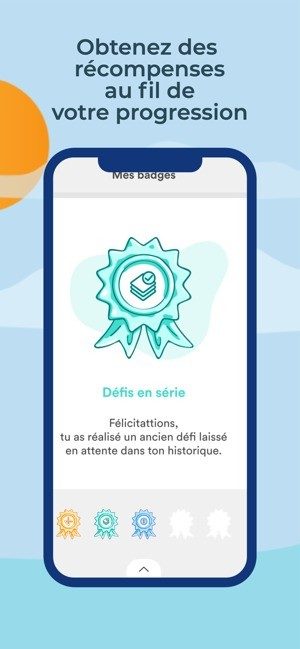
It’s not just points for the sake of points. The app uses active pedagogy. You earn badges and level up, sure, but the feedback loop is designed to explain why a habit matters.
The challenges change. One week it’s about water management. The next, it’s sustainable food choices. You aren’t stuck in a static list. The app adapts.
You can also team up. Work with friends, compare progress, share successes on social media. The community aspect keeps you motivated when solo effort starts to feel boring. It turns individual guilt into collective momentum.
What is the real ecological impact?
It’s not just about one person buying fewer plastic bottles. It’s about scale.
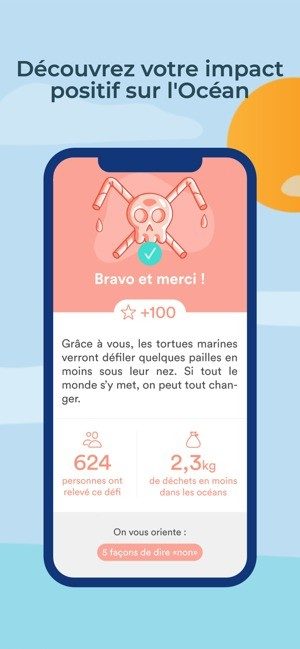
When thousands of users start acting simultaneously, behavior change happens faster. Local initiatives use the app to organize neighborhood challenges and large-scale awareness campaigns. The data helps measure the actual impact of these collective efforts.
The app positions itself as a bridge. It takes the complex, overwhelming world of climate action and breaks it down into small, manageable steps. Whether you’re doing it alone, with your family, or as part of a professional team, the goal is the same: make sustainable habits stick.
The roadmap is open. Future updates might add specialized modules for schools or group workshops. But right now, the core promise holds. It’s a free, evolving, and highly accessible tool for anyone who wants to do more for the planet without needing a degree in environmental science or a wallet full of cash.
How to Download Ocean’s Zero and What Specs You Actually Need
Getting the app on your phone is straightforward. You do not need a high-end gaming rig or a specific processor. You just need a recent smartphone or tablet running either Android or iOS. The distribution happens through the official channels: Google Play for Android devices and the App Store for iPhone and iPad users.
Why does it matter where you download from? Because the official stores handle the heavy lifting. They push regular updates, ensure the installation is clean, and keep the experience consistent. Trying to sideload this from a random website risks security issues and breaks the sync features. Stick to the stores.
The app size varies. It depends on your device architecture and your operating system version. This is standard behavior for mobile software. You need an internet connection for the initial download, account synchronization, and receiving updated content. Once installed, the interface is mobile-first, designed for quick daily check-ins rather than long sessions.
Does Ocean’s Zero Work on PC or Mac?
No. There is no native version for Windows, macOS, or Linux. If you are looking to run this on a desktop, you are out of luck. The developer has locked the experience into the mobile ecosystem.
This is a deliberate choice. The app is built for touch interactions and on-the-go usage. If you try to find a workaround using an emulator, you lose the official support and likely the cloud synchronization. The “Projet Ocean’s Zero” team has focused entirely on mobile compatibility.
Key Technical Details for Compatibility
Before you hit the download button, check your setup against these requirements. The app is free, with no mandatory subscription. You do not have to pay to unlock the core features.
- Developer: Projet Ocean’s Zero
- Supported OS: Android and iOS only
- Devices: Smartphones and tablets
- Language: French interface is standard; other languages may appear depending on your store region
- Internet Connection: Required for downloading, syncing, and updates
- Account: Creating a user account is recommended. It lets you back up your progress to the cloud and restore it if you switch devices.
Why You Should Create an Account
You might be tempted to skip the signup. Do not. The account creation process links your progress to the cloud.
If your phone dies or you upgrade to a new device, your data stays intact. Without an account, you start from scratch every time. The synchronization feature is what makes the app useful over the long term. It tracks your challenges and progress in real-time.
Also, the app falls under Education, Leisure, and Health categories. The personalized guidance feature only works when the app knows who you are. So, yes, sign up. It takes thirty seconds and saves you the frustration of losing your history later.
The mobile ecosystem ensures a homogeneous experience over time, but only if you stay within the official store framework.
Is It Worth Downloading If You Have an Older Device?
Check your OS version. The minimum configuration is simply a mobile device compatible with a supported version of Android or iOS as defined by the respective stores. If Google Play or the App Store lists the app as compatible with your current OS, you are good. If not, you might need to update your system first.
The app is designed for fluidity. From installation to customizing your challenges, the user journey is meant to be smooth. But “smooth” assumes a stable internet connection and a device that isn’t running on the last breath of its battery life.
Download it from the official source. That is the only way to ensure you get the latest functional improvements and a secure environment. Anything else is a gamble.

The migration isn’t just about moving files. It’s about breaking dependencies. Windows Server 2022 and later versions have specific requirements for the underlying infrastructure that older setups simply don’t meet. You cannot just lift-and-shift a legacy VM and call it a day. The hypervisor, the storage layer, and the networking stack all need to speak the same language.
This is where the complexity creeps in. If your environment is a mix of Hyper-V clusters, physical bare metal, and maybe some public cloud instances, the consistency gets tricky. Microsoft’s own documentation pushes you toward standardization. But standardization often clashes with the messy reality of existing IT landscapes. You end up writing scripts to handle edge cases that the official guides assume you don’t have.
How to handle legacy applications that refuse to move
Some software is stubborn. Legacy enterprise apps, particularly those written for older .NET frameworks or dependent on specific Windows components that are being phased out, can break the migration chain. You aren’t just moving an operating system; you’re carrying a baggage of dependencies.
One common workaround is application virtualization. Tools like Microsoft Application Compatibility Shimming can sometimes trick older software into running on newer OS versions. It’s not a fix, but it buys time. For others, you might need to keep a small cluster of Windows Server 2019 or 2016 instances specifically to host these stubborn applications, while the rest of the estate moves forward. It’s a hybrid model, which adds management overhead, but it prevents a catastrophic failure on day one.
Why network segmentation matters more than ever
Security isn’t a checkbox you tick after the migration. It’s a structural element. As you move workloads, you’re redrawing the boundaries of your network. If you’re using Azure or AWS, the VPC or Virtual Network design dictates how traffic flows. If you’re on-premises, your VLAN structure and firewall rules need to be updated to reflect the new IP addresses and subnets.
A common mistake is leaving default routes open. In a cloud environment, this is a significant risk. You need to ensure that private subnets don’t have public internet access unless explicitly required. Use Network Security Groups (NSGs) in Azure or Security Groups in AWS to restrict inbound and outbound traffic at the instance level. It’s granular, yes, but it’s necessary.
“Security is not a destination; it is a continuous process of adaptation.”
What happens to your data during the transfer
Data integrity is the biggest worry for most IT teams. A corrupted database dump can take down an entire business operation. You don’t want to find out there’s a checksum mismatch three days after go-live.
Use verified backup solutions before you start moving anything. Snapshot your VMs. Create full backups. Verify them. If you’re moving databases, use native replication tools where possible. SQL Server Always On Availability Groups, for example, allow you to replicate data to a secondary instance before you cut over. This gives you a warm standby that you can switch to if the primary fails during the migration. It’s not just about moving data; it’s about proving the data is safe.
Comparing cloud migration vs. on-premises upgrades
The choice between moving to the cloud and upgrading your physical servers is rarely black and white. It depends on your scale, your budget, and your existing infrastructure.