


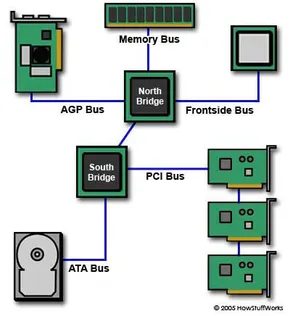
The bus is basically the central nervous system of the motherboard. Connect different components so they can communicate with each other. The more data the bus can handle at once, the faster the information travels through the circuit. Bus speed is simply a measure of that throughput capacity.
In modern systems, bandwidth is often expressed as the number of lanes in a PCIe connection. Think of these like lanes on a freeway. Each lane has two pairs of wires, one for sending data and one for receiving. These lanes exist inside the motherboard, not on the surface. The device must have enough channels to handle their required throughput. If you’re building a high-end gaming machine with a powerful GPU, you need more channels. For a basic office computer, probably doesn’t need as many.
Bus speed usually refers to the Front Side Bus (FSB) that connects the CPU to the Northbridge. FSB speeds range from 66 MHz to over 800 MHz. Since the CPU accesses memory through the northbridge, the speed of the FSB speed has a direct impact on overall performance.
Other major buses on a typical motherboard include:
- Backside Bus Connects CPU to Level 2 (L2) cache (also known as L2 cache or external cache). The CPU determines the speed of this bus.
- Memory bus connects the northbridge to the RAM.
- The IDE or ATA bus connects the southbridge to the disk drives.
- The AGP bus connects the graphics card to the memory and the CPU. Its speed is typically 66 MHz.
- The PCI bus connects the PCI slots to the southbridge. Most systems operate at a frequency of 33 MHz. PCI Express is compatible with PCI software and operating systems but is much faster. It’s likely to replace both PCI and AGP buses.
The faster the bus speed, the faster your computer will run. To some extent. A faster bus cannot compensate for a slower CPU or chipset.
Now let’s look at memory and how it affects the speed of the motherboard.


